Universal Hubs - Write the Hub Once, Connect Over Bluetooth or Wi-Fi
On this page
A couple of weeks ago I wrote about BLE Hubs: the SignalR hub model, on Bluetooth LE. One interface, a generated proxy, calls, streams, events and groups, with no byte arrays in sight. Two phones in the same room, no network, and it just works.
Then I started actually playing the sample game.
On the couch, fine. Then somebody went to the kitchen and dropped out of the game. Then a friend wanted to join from upstairs. Then I wanted to send a photo instead of a tiny avatar and watched it crawl across GATT at a few KB/s. And all the while, every one of those phones was sitting on the same Wi-Fi network, with more range and more bandwidth than Bluetooth will ever have, doing nothing.
Bluetooth is the right answer on a plane. At home, it’s the wrong one. And I didn’t want to pick.
What I didn’t want
The obvious fix is “write a Wi-Fi version”. A SignalR server, or a socket protocol, next to the BLE hub. And then you own two of everything: two contracts that drift apart, two hubs with the same game logic, two connection models, two sets of disconnect handling, and a game where the Wi-Fi players and the Bluetooth players can’t see each other.
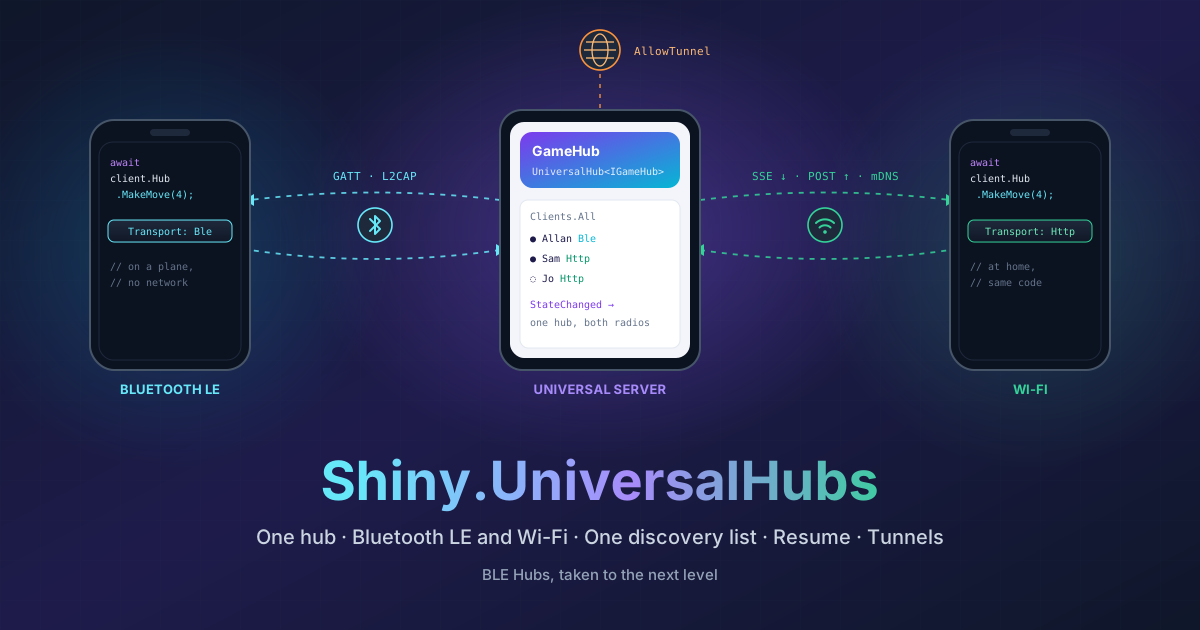
What I wanted was this: the hub I already wrote, reachable both ways, and the client picks. No change to the contract. No change to the hub. A player on Wi-Fi and a spectator on Bluetooth in the same game, getting the same pushes in the same order.
That’s Shiny.UniversalHubs.
Where this lives
 Shiny.UniversalHubs.HostAddUniversalServer, UniversalHub<T> and IUniversalHubHost: one hub served over BLE and Wi-Fi, advertised over mDNS.Shiny.UniversalHubs.ClientIUniversalHubClient<T>: one discovery list for BLE and mDNS, prefer one transport and fall back to the other.Shiny.UniversalHubsThe shared Wi-Fi wire protocol. Comes with both.
Three libraries I already had
The nice thing about this one is that I didn’t have to invent much. The pieces were already sitting in Shiny:
- BLE Hubs already had the hub: the generated dispatcher, groups, ordered pushes, streaming, timeouts and typed disconnect reasons.
- Shiny.Net.HttpServer is a real HTTP server that runs inside a MAUI app, and its Switchboard gives you a long-lived “line” per client: server-sent events down, POSTs up, and a resume window when the line drops.
- mDNS (Bonjour) lets phones on a network find each other without anyone typing an IP address.
So the job was to glue them together without letting any hub logic leak out of blehubs. I added two small, hidden seams to blehubs: a transport endpoint on the host and an external transport on the client. Universal Hubs only carries hub calls through them. Everything that makes a hub a hub still lives, and is tested, in one place.
The host: one call, two transports
services.AddUniversalServer(server => server
    .Ble(o => o.EnableFileTransfers(filesDir))
    .AddHub<GameHub>(CharacteristicUuid, "_mygame._tcp", o => o.MaxClients = 6)
);
The characteristic is the hub’s address over Bluetooth. The _mygame._tcp service type is its address over Wi-Fi.
The HTTP server picks a free port, mDNS tells everyone which one, and MaxClients counts players on both transports
together.
Starting it is one call too, and it brings up whatever this device can do right now:
await host.Start(HubTransports.All); // BLE, Wi-Fi, or bothYour existing BleHub<T> works as-is. But I wanted hubs to be able to tell who’s on what, so there’s
UniversalHub<T>:
public class GameHub : UniversalHub<IGameHub>
{
    public override Task OnConnectedAsync(HubConnection connection)
    {
        // connection.Transport is Ble or Http
        return Groups.AddToGroupAsync(connection.Id, "lobby");
    }

    public async Task<MoveResult> MakeMove(int cell)
    {
        // ...
        await Clients.All.StateChanged(engine.Snapshot());   // reaches everyone, whatever they're connected over
        return new MoveResult(true, null);
    }
}Clients.All, groups, IHubContext<GameHub>, Context.Abort: all of it spans both transports.
The client: one list, best transport wins
services.AddUniversalHubClient<IGameHub>(CharacteristicUuid, "_mygame._tcp");client.DiscoverAll().Subscribe(host => /* host.Name, host.Transports */);
await client.Connect(host, new HubConnectOptions("Allan") { Prefer = HubTransports.Http });
await client.Hub.MakeMove(4);Discovery merges the BLE scan and the mDNS browse, so a host you can reach both ways shows up once, with both
badges. Connect tries the transport you prefer and falls back to the other one. After that, client.Hub is the same
generated proxy you already had. The events, streams, Disconnected and UploadFile don’t know or care which radio
they’re on.
That’s the part I’m happiest with. The game code in the sample didn’t change at all. The join page got a couple of badges.
The bits I didn’t expect to love
Wi-Fi blips don’t end the game. Phones drop Wi-Fi for a second all the time: switching access points, waking up, someone microwaving popcorn. Over Switchboard, the line comes back with the same connection id and the same groups, and the pushes it missed are replayed. The hub never sees a disconnect. Bluetooth never gave me that.
One hub at a time. The sample has an always-on chat hub that starts with the app, and a game hub that only runs while you’re hosting:
await host.StartHub<ChatHub>();             // at app start, and left running
await host.StartHub<GameHub>();             // when you tap Host
await host.StopHub<GameHub>("Game over");   // the chat carries on
The internet. Once the Wi-Fi side is a real HTTP server, a tunnel puts it on the internet. That exposes the whole server, so each hub has to opt in. The chat does. The game doesn’t, and answers 404 through the tunnel:
.HttpServer(http => http.AddQuickTunnel())
.AddHub<ChatHub>(ChatCharacteristic, "_mychat._tcp", o => o.AllowTunnel = true)
A friend on cellular, nowhere near my house, connects with the URL:
await client.Connect(HubHostInfo.FromUrl(new Uri("https://abc.a.pinggy.link")));A library that started as “two phones on a plane” can now take a message from the other side of the world, and the hub code is the same. (Do put authentication in front of anything you share on the internet.)
Files get fast. UploadFile and DownloadFile go over L2CAP on Bluetooth and plain HTTP on Wi-Fi. Same call,
very different speed.
Keeping it honest
Two transports means two ways for things to go subtly wrong, so I put some rules on myself:
- The wire is versioned. Each hub is a Switchboard with a few reserved methods (
hub.handshake,hub.invoke,hub.stream,hub.push), and the handshake refuses a mismatched version. - JSON is re-framed, never re-serialized. The exact JSON your serializer produced for Bluetooth is what goes over
Wi-Fi. One
JsonSerializerContext, both transports, no reflection, AOT- and trim-safe. - Disconnects mean the same thing everywhere.
ClientDisconnect,ClientTimeout,ServerDisconnect,ServerShutdown,ConnectionFailed: same reason on both transports, on both sides. - Real host, real client in the tests. The test suite runs the actual host and client against an in-memory HTTP transport, with no network and no hardware. Then I go run it on actual phones anyway.
And some things it can’t fix. Plane, hotel and coffee-shop Wi-Fi usually isolate devices from each other, which blocks mDNS and device-to-device traffic. That’s precisely why Bluetooth is still there as the fallback. Hosting is foreground-only, same as BLE hosting. And the transport is picked when you connect. Moving a live game from Bluetooth to Wi-Fi as someone walks in the door is on my list, but it isn’t in this release.
Go play
The sample is the tic-tac-toe game from BLE Hubs, now hosting over both transports, plus the always-on chat. It runs on iOS, Android and, thanks to .NET MAUI’s new AppKit backend, macOS, so my laptop can host a game for the phones around it.
The docs are at shinylib.net/universalhubs, and the code is at github.com/shinyorg/universalhubs. If you’ve already built something on BLE Hubs, swapping two registration calls gets it working over Wi-Fi. I’d love to hear what happens when you try.