Shiny.Net.HttpServer — A Real HTTP Server Where ASP.NET Core Will Not Go
On this page
I wanted to point an AI client at an app running on my phone.
Not at a cloud service that the phone syncs with. At the phone. The device is where the interesting data already lives — the notes, the files, the sensors, the thing the user actually did five minutes ago — and I wanted an MCP server sitting right there, on the device, so a model could ask it questions directly.
The MCP SDK has an HTTP transport. Lovely. It is an ASP.NET Core package.
And that is the wall. ASP.NET Core does not run on .NET MAUI. It never has. It is not a MAUI problem
or an iOS problem exactly — it is that Kestrel and the hosting stack assume a world of
Microsoft.AspNetCore.App, a framework reference you cannot take on a phone. So the moment you want
to serve HTTP from a device rather than call it, you are on your own.
I have hit this wall enough times now — an MCP endpoint, a webhook receiver for local debugging, a “send this file to my laptop” screen, a config UI for a headless appliance, a Blazor WASM app served off a Raspberry Pi — that I finally stopped working around it.
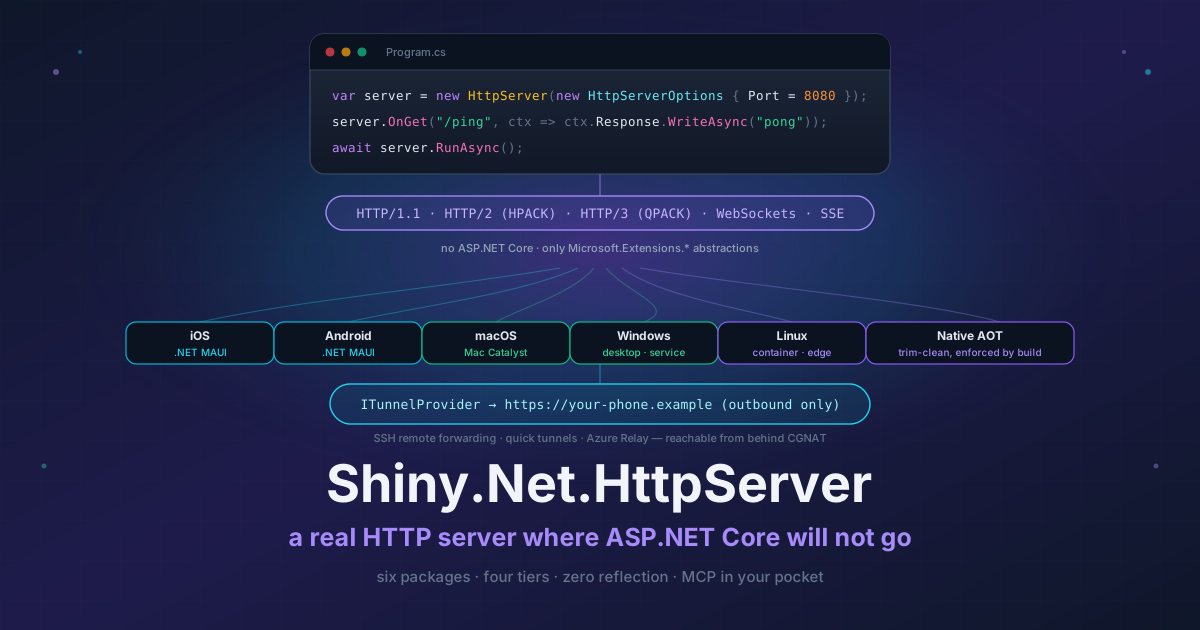
So: Shiny.Net.HttpServer. A real HTTP server, written from scratch, that runs anywhere .NET runs. It is in beta today.
var server = new HttpServer(new HttpServerOptions { Port = 8080 });
server.OnGet("/ping", ctx => ctx.Response.WriteAsync("pong"));
await server.RunAsync();
That is the whole thing running. Three lines, no host builder, no Microsoft.AspNetCore.App.
What “dependency-light” actually means here
This is the part I care about most, so let me be precise rather than hand-wavy.
The only dependencies are Microsoft.Extensions.* abstractions. That is it. Everything else is
built on what ships in the box:
- JSON is
System.Text.Json, source-generated, no reflection - The JWT package does its own crypto — no
Microsoft.IdentityModel, noSystem.IdentityModel.Tokens.Jwt - HTTP/2’s HPACK and HTTP/3’s QPACK are implemented in the library
- The OpenAPI document is assembled from compile-time metadata, not a document object model
- TLS certificates — including self-signed ones generated on the device — are managed code
I did not do this to be clever. I did it because every one of those is a package that either drags in a dependency graph you cannot afford on a phone, or does something reflective that dies under trimming. And on iOS, trimming is not a choice you get to make.
Which leads to the rule the whole repo is built around: every shipping project has the trim, AOT and single-file analyzers turned on. “AOT-clean” is a build failure if you get it wrong, not a sentence in a readme. There is exactly one package that opts out, and it says so loudly and explains why — more on that below.
The four tiers
The thing I wanted to avoid was a framework with one correct way to write an endpoint. So there are four, each built on the one below, and they compose in the same app.
Tier 0 — one delegate. No routing, no ceremony. You get a request, you write a response.
server.OnRequest(async ctx => await ctx.Response.WriteAsync("hello"));Tier 1 — routes. Templates with constraints, and they are mutable at runtime, which matters more than it sounds when the server is embedded in an app that toggles features.
server.OnGet("/api/users/{id:int}", async ctx => { /* … */ });Tier 2 — middleware. ASP.NET-shaped, because everyone already knows the shape.
server.UseAuthentication();
server.Use(new MyRequestCounter());
server.UseEmbeddedFiles(typeof(App).Assembly, "MyApp.wwwroot");
Tier 3 — source-generated typed endpoints. A class, constructor injection, typed parameters bound at compile time. The generator emits the route registration, the binding and the OpenAPI metadata. No reflection at runtime, nothing to trim away.
[Route("/api/users")]
public class UserEndpoints(IUserService users, ILogger<UserEndpoints> logger)
{
    [Get("/{id:int}")]
    public async Task<IActionResult> GetUser(int id, CancellationToken ct)
        => await users.FindAsync(id, ct) is { } u ? new OkObjectResult(u) : new NotFoundResult();
}

app.MapMyAppEndpoints();   // emitted for every [Route] class in the assembly
Both result spellings work — Results.Ok(…) if you think in minimal APIs, IActionResult if you
think in MVC. I got tired of picking sides.
What is in the box
The short version, because the docs go deeper on all of it:
- Protocols — HTTP/1.1, HTTP/2, HTTP/3, WebSockets, Server-Sent Events. The version is never guessed: ALPN over TLS, connection preface over cleartext.
- Content — static files from disk or embedded resources, a published Blazor WebAssembly app, streaming multipart uploads, byte ranges and conditional GETs, a file browser over a directory, brotli/gzip/deflate.
- Security — authentication and authorization split ASP.NET-style, with Basic, API key, cookie and JWT schemes, plus policies, roles, claims, CORS, rate limiting and IP filtering — all with per-endpoint policies.
- TLS — multiple endpoints with per-endpoint TLS, self-signed certificates generated in managed
code (iOS and Android included), client certificates, and SPKI pinning for your own
HttpClient. - Lifecycle — start, stop and restart at runtime, serialized and idempotent, with observable state. An embedded server gets toggled, not just booted, and that turned out to be a surprising amount of the design.
A real IServiceScope per request, RFC 9457 problem details, and an exception-handler chain are all
there too. Route constraints cover the types you would expect and a few you have to hand-roll
elsewhere — {id:byte}, {on:dateonly}, {page:range(1,100)} — and a constraint decides whether a
route matches, never converting anything, so a refused segment is a 404 and one that matched but
will not parse is a 400. Responses can send trailing headers on all three protocol versions, which is
the bit I needed for gRPC and had not appreciated was missing.
Getting a phone onto the internet
A server on a phone is useless if nothing can reach it. A cellular device sits behind carrier-grade NAT with no routable address and no port you could forward, and you cannot ship an agent process like ngrok or cloudflared to iOS — there is no process to spawn.
So tunnelling is a first-class part of this, through a pluggable ITunnelProvider. The device opens
an ordinary outbound connection and asks the far end to forward traffic back down it. There is a
reference relay (both ends), an Azure Relay provider, and SSH remote forwarding — ssh -R, in
library form, in pure managed code so it runs on iOS.
And then the one I actually use, which needs no account and nothing installed:
builder.Services.AddQuickTunnel();

// from a Share button:
var url = await tunnel.StartAsync();   // https://xxxxx.free.pinggy.net
QuickTunnel is INotifyPropertyChanged, so a view binds straight to PublicUrl and State.
Bind to it — do not read it once. A free tunnel hands out a different address on every reconnect,
and a phone reconnects every time it changes network. An app that painted the first URL on a label is
showing a dead link ten minutes later.
A war story from building this, since it is the kind of thing that only shows up against real
servers: the default host used to be localhost.run, and it never worked. It forwards fine, but it
never confirms the SSH session request that carries your assigned URL. The ssh binary does not
wait for that confirmation and prints the address anyway; SSH.NET waits, and there is no supported
way around it because the channel types are internal to the library. So the tunnel came up, stalled
for thirty seconds, and then reported a URL scraped out of the provider’s welcome banner — which
was a link to their dashboard. It looked like it worked. It absolutely did not.
That is fixed. The default is a host that answers, the URL pattern is anchored per provider instead
of grabbing the first https:// it sees, the capture is properly time-bounded, and a tunnel that
cannot learn its address now returns null and tells you why instead of inventing one. Which is a
better failure than the one I shipped.
An MCP server in your pocket
Back to where this started.
builder.Services
    .AddMcpServer(o => o.ServerInfo = new() { Name = "thermostat", Version = "1.0.0" })
    .WithTools<ThermostatTools>()
    .WithHttpTransport();

var app = builder.Build();
app.MapMcp();              // POST/GET/DELETE/OPTIONS on /mcp
That is a Model Context Protocol server, Streamable HTTP, hosted inside a MAUI app. Put a quick tunnel in front of it and you can paste the URL into an MCP client and have a model talking to the device from anywhere.
The MCP package is trim- and AOT-clean like the rest, with one wrinkle the compiler cannot catch for you. A tool’s parameter and return types get published to the client as a JSON schema, and building that schema by reflection does not survive trimming. Tools that trade only in primitives need nothing. For everything else, hand it a source-generated context:
[JsonSerializable(typeof(Query))]
[JsonSerializable(typeof(IReadOnlyList<Reading>))]
public partial class ToolJson : JsonSerializerContext;

.WithTools<ThermostatTools>(ToolJson.Default.Options)
Miss one and MapMcp() throws at startup naming the type and the context to add — rather than
handing you a NotSupportedException from deep inside the container on the first request, which is
what it used to do.
Then it kept growing
I meant to stop at the MCP transport. What actually happened is that once a real server existed, every “I wish the device could just serve this” idea I had shelved over the years became a half-day’s work. Four more packages came out of that, plus the thing I should have built first.
Speaking something other than JSON
JSON covers most of what an HTTP API does, and “most” is doing a lot of work in that sentence. The
integration on the far side of a corporate gateway wants XML. The battery-powered client would rather
not spend 40% more radio time on braces. The service upstream already has protobuf messages generated
from a .proto.
So formats plug in on both sides now — IOutputFormatter was always there for responses, and
IInputFormatter is the half that was missing:
builder.Services.AddContentNegotiation(o =>
{
    o.NegotiateByDefault = true;
    o.AddXml();
    o.AddMessagePack();
});
That is the whole setup, and no endpoint changes. Request bodies are dispatched on
Content-Type, so every [FromBody] parameter you already wrote now accepts XML and MessagePack;
responses come from Accept.
Here is the part I find genuinely interesting. The obvious way to do XML is XmlSerializer, and it is
unusable here — it builds its mapping by reflecting over your type at runtime, which is exactly what a
trimmed app has thrown away. Same story for MessagePack-CSharp’s default resolver. The way out was to
stop looking for a second serializer at all: your types already have source-generated JsonTypeInfo
metadata, with the property names and converters already decided, so XML and MessagePack are written
against that. Which means no dependency, no [XmlRoot], no [MessagePackObject], no second set of
attributes to keep in sync with the first — and the JSON and XML representations of an endpoint
literally cannot drift apart, because there is only one source for both.
Reading XML has to be type-directed for the same reason, and this is the bug I most wanted to avoid
shipping: XML has no types. <postalCode>01234</postalCode> is text. Guess from the text and that
postal code arrives as the number 1234, in production, quietly. Ask the target member what it is and
it stays a string.
Protobuf is the honest exception. It cannot be produced without a schema — field numbers live in the
.proto, and the only thing that has them is the code protoc already generated — so you hand over
the pair your generated messages already expose, one line each:
o.AddProtobuf(p => p.Add<Reading>(m => m.ToByteArray(), Reading.Parser.ParseFrom));No new dependency in the package, and nothing reflecting over your messages. Same registry takes CBOR, Avro, or MessagePack-CSharp’s native codec if you want the real thing rather than my transcoder.
One behaviour change worth flagging: a body whose Content-Type nothing reads is now a 415, where
it used to be a 400. “Your JSON is broken” sends someone hunting for a syntax error that is not there.
“I do not speak protobuf” sends them to fix a header.
gRPC, on a phone
This one still amuses me. Grpc.Net.Client, grpcurl, any gRPC client in any language — talking to a
service hosted inside a MAUI app.
app.MapGrpcService("greet.Greeter", svc =>
{
    svc.AddMarshaller<HelloRequest>(m => m.ToByteArray(), HelloRequest.Parser.ParseFrom);
    svc.MapUnary<HelloRequest, HelloReply>("SayHello", (req, ctx) => …);
});
All four method shapes, streams as IAsyncEnumerable<T> in both directions flushed as they yield,
deadlines from grpc-timeout arriving as your CancellationToken, per-message compression, status in
trailers. Marshalling is yours for the same reason as protobuf above, which is also why the package
adds no dependency.
gRPC-Web is on by default in both framings, and that is not a nicety — it is how a browser calls in, and how anything stuck on HTTP/1.1 does. It matters here more than it does on a server: native gRPC needs a tunnel that forwards raw TCP, and most of the hosted ones terminate HTTP/1.1, so gRPC-Web is what actually reaches a phone from the internet.
MaxReceiveMessageSize is enforced on the decompressed size, not just the length prefix. A few
compressed kilobytes expanding into gigabytes is not a message size problem, it is a denial of service.
Your app’s storage, as a drive in Finder
The file browser I shipped is a JSON API you drive with curl. Fine, and also: every desktop already
has a WebDAV client built in.
app.MapWebDav("/dav", o =>
{
    o.RootPath = FileSystem.AppDataDirectory;
    o.AllowWrite = true;
})
.RequireAuthorization();
Point Finder or Windows Explorer at that and the app’s storage is a drive. RFC 4918 classes 1 and 2 —
PROPFIND, PROPPATCH, MKCOL, COPY, MOVE, LOCK/UNLOCK, the If header.
Class 2 is on by default and is not really optional, which I learned the way you would expect: Finder
and the Windows redirector both mount a class 1 server read-only no matter what your options say. And
a LOCK on a URL that does not exist yet has to create an empty resource for it, because that is what
a Mac does when you save a new document — answer 404 there, which is what I did first, and the mount
simply cannot be written to.
PROPFIND with Depth: infinity is refused by default. A missing Depth header means infinity per
the spec, so it gets the same refusal. Walking a phone’s entire storage into one XML response is not a
feature.
Two integrations, because the plumbing was already there
Mediator. If you already write Shiny.Mediator handlers, they can be endpoints:
[MediatorHttpGroup("/api/gadgets")]
public class GadgetHandlers : IRequestHandler<GetGadget, Gadget>
{
    [MediatorHttpGet("/{id:int}")]
    public Task<Gadget> Handle(GetGadget request, IMediatorContext ctx, CancellationToken ct) => …;
}

app.MapGeneratedMediatorEndpoints();
It is the Shiny.Mediator.AspNet shape without ASP.NET Core. The binding had to change to get here:
the ASP.NET version uses [AsParameters]/[FromBody], which is reflection over a delegate’s
parameters and annotated RequiresDynamicCode. Here a generator writes the binding member by member,
so a contract that cannot be bound is a build error rather than a 500. An ICommand answers with a
status code and no body; an IStreamRequest<T> becomes Server-Sent Events, which is a suspiciously
good fit.
DocumentDb. And if the data lives in Shiny.DocumentDb, a document type is a whole REST resource in one line:
app.MapDocuments<Order>("/orders", o =>
{
    o.TypeInfo = AppJson.Default.Order;
    o.AllowFilterOn(x => x.Status, x => x.Total);
    o.Scope<ITenantContext>((tenant, _) => x => x.TenantId == tenant.TenantId);
})
.RequireAuthorization("orders");
List, by-id, count, create, replace, RFC 7396 merge-patch, delete, and a live SSE tail — with
filtering, cursor paging, sparse fieldsets and ETag/If-Match. It is a port of the ASP.NET Core
version onto this server, running the same engine, so the semantics are identical on both. A phone can
serve its own database, and through a tunnel, so can anyone else reach it.
Two things I changed deliberately. MapDocuments returns a builder that fans RequireAuthorization
across every route it registered, because this server attaches metadata per route rather than per
group and I did not want adding an operation later to quietly leave one unprotected. And there is no
reflection fallback when TypeInfo is unset — a fallback that works on your laptop and throws on a
trimmed phone is worse than a clear error in both places.
Server-side scopes answer 404, not 403, for a document outside the scope. Telling a caller “that exists, you may not have it” is a leak dressed up as correctness.
The packages
| Package | What it is |
|---|---|
Shiny.Net.HttpServer |
The server — protocols, routing, middleware, DI, static files, WebSockets, SSE, sessions, OpenAPI, CORS, rate limiting, IP filtering, content negotiation with XML/MessagePack/protobuf, tunnelling. Carries the tier 3 generator as an analyzer, so it runs in the compiler and never lands in your output |
Shiny.Net.HttpServer.Jwt |
JWT auth on in-box crypto |
Shiny.Net.HttpServer.Ssh |
SSH remote forwarding and quick tunnels |
Shiny.Net.HttpServer.AzureRelay |
Azure Relay tunnel provider |
Shiny.Net.HttpServer.Mcp |
MCP over Streamable HTTP, no ASP.NET Core required |
Shiny.Net.HttpServer.Grpc |
gRPC and gRPC-Web — all four method shapes, marshalling supplied by you |
Shiny.Net.HttpServer.WebDav |
A directory as an RFC 4918 class 1 & 2 mount |
Shiny.Net.HttpServer.Mediator |
Shiny.Mediator handlers published as endpoints, bound at compile time |
Shiny.Net.HttpServer.DocumentDb |
A Shiny.DocumentDb document type as a complete HTTP resource |
The honest bits
Two packages are deliberately not AOT-clean, and I would rather say so here than have you find out during a Release build.
Shiny.Net.HttpServer.Ssh carries SSH.NET, which brings BouncyCastle and its own algorithm
registries. Shiny.Net.HttpServer.AzureRelay drags in Azure.Identity, MSAL and IdentityModel. Both
live in their own packages precisely so that the trade is yours to make: reference them and you
accept the weight, skip them and the core server stays a few megabytes of clean AOT.
The other seven hold the line, including all four of the new ones — which is most of why gRPC and
protobuf ask you for marshalling rather than discovering it. Shiny.Net.HttpServer.DocumentDb needs
Shiny.DocumentDb 13.2.1 or newer, since that is the release carrying the public hosting surface it is
built on.
This is also a beta. The API surface is where I want it and the test suite is real — around 1,260 tests, all of them against a live socket rather than an in-memory harness, because most of what a server can get wrong only exists at that boundary. But it has not had a thousand people hitting it in anger yet. If you put it somewhere interesting, I want to hear what broke.
And the standing warning, because a tunnel makes it matter: a quick tunnel hands a public HTTPS address to anyone who learns it, pointed at a server whose defaults were chosen for loopback. Put authentication in front of it before you open one, not after.
Go play
dotnet add package Shiny.Net.HttpServerDocs are at shinylib.net/httpserver, source at github.com/shinyorg/httpserver. There is a MAUI sample in the repo that does the whole tour — serves a page, exposes a file browser, requires a password, runs an MCP server and puts the lot on the public internet behind a button.
Your phone is a perfectly good web server. It always was. It just needed something to run.