Three Desktop Apps, One Stack: Shiny Commander, Notcho and FileServe
Samples lie, so I built real apps. A tour of three shipping desktop apps on .NET MAUI, maui-labs and Shiny: Shiny Commander, a dual-pane file manager; Notcho, which turns the MacBook camera notch into a live panel; and FileServe, a self-hosted team file server with NuGet and npm feeds. Native AppKit on macOS, GTK4 on Linux, WinUI on Windows.
On this page
I’ve been writing libraries for .NET mobile and desktop for a long time, and I’ve learned one thing the hard way: a library is only as good as the apps built on it. Samples lie. They show the happy path and nothing else. Real apps find the gaps.
So for most of this year I’ve been building three real desktop apps on top of Shiny and .NET MAUI Labs, shipping them with signed installers and auto-updates, and fixing every gap the libraries showed along the way. This post is the tour: what each app does, which parts of the stack it uses, and links to everything.
| App | What it is | Website | Source | Download |
|---|---|---|---|---|
| Shiny Commander | A keyboard-first, dual-pane file manager | Website | GitHub | Releases |
| Notcho | Turns the MacBook camera notch into a live panel | Website (live demo) | GitHub | Releases |
| FileServe | A self-hosted file server for a team, with NuGet and npm feeds | Website | GitHub | Releases |
All three are desktop apps, and all three build from one shared .NET MAUI codebase per app that runs on three native heads:
- macOS on native AppKit (
Microsoft.Maui.Platforms.MacOS), not Mac Catalyst - Linux on GTK4 (
Microsoft.Maui.Platforms.Linux.Gtk4) - Windows on the standard WinUI head
The source for all three is public on GitHub, so you can see exactly how each Shiny library is wired in. Notcho and FileServe are source-available: read them and learn from them, but don’t repackage them. The Shiny libraries underneath are MIT, like always.
The shared stack
Before the individual apps, here’s what they have in common, and which app uses what.
| Commander | Notcho | FileServe | |
|---|---|---|---|
| maui-labs AppKit head | ✅ | ✅ | ✅ |
| maui-labs GTK4 head | ✅ | ✅ | ✅ |
| MAUI DevFlow | ✅ UI test suite | ✅ | ✅ |
| Shiny.Maui.Controls | ✅ | ✅ | ✅ |
| Shiny.Maui.Controls.Desktop | ✅ | ✅ | ✅ |
| Shiny.Blazor.Controls | ✅ | ||
| Shiny.Core | ✅ | ✅ | |
| Shiny.Extensions.DependencyInjection | ✅ | ✅ | |
| Shiny.Extensions.Stores | ✅ | ✅ | |
| Shiny.Extensions.Localization.Generator | ✅ | ||
| Shiny.Maui.Shell | ✅ | ||
| Shiny.Mediator | ✅ | ||
| Shiny.Net.HttpServer | ✅ | ✅ | |
| Shiny.Net.Discovery | ✅ | ||
| Shiny.AppDeviceBridge | ✅ | ||
| Shiny.DocumentDb | ✅ | ||
| Shiny.Notifications | ✅ | ||
| Shiny.Calendar | ✅ | ||
| Shiny.Audio | ✅ |
.NET MAUI Labs
dotnet/maui-labs is where the experimental MAUI work lives, and these apps use three parts of it:
- The AppKit backend. A MAUI app as a real macOS app:
NSWindow, native menus, real AppKit controls,WKWebViewfor Blazor. No Catalyst. That matters for apps like Notcho, which needs a borderless agent window that sits over the menu bar, and for FileServe, which lives in the menu bar as anNSStatusItem. - The GTK4 backend. The same MAUI XAML running on Linux, packaged as
.deband.rpm. - DevFlow. An in-app agent plus the
maui devflowCLI and an MCP server. It inspects the visual tree, taps, types and takes screenshots of a running app. Commander’s whole UI test suite drives the real macOS app through it, and the same run regenerates its README and website screenshots.
There’s no Linux TFM, so a GTK4 head is a plain net10.0/net11.0 project. Commander shares its UI as linked source that each head compiles (so each head runs its own XAML compiler and source generators); FileServe keeps its UI in a plain net10.0 project every head can reference. Notcho puts the views and services in Notcho.Core and gives each head a handful of platform interfaces to implement.
From .NET MAUI Labs
 Microsoft.Maui.Platforms.MacOSThe native AppKit backend for .NET MAUI. A real macOS app, not Mac Catalyst.Microsoft.Maui.Platforms.Linux.Gtk4The GTK4 backend for .NET MAUI on Linux.Microsoft.Maui.DevFlow.AgentThe in-app agent DevFlow inspects and drives the app through.
Shiny Controls everywhere
Every one of these apps is dressed in Shiny Controls. Desktop apps need things the MAUI box doesn’t have: a ribbon, keyboard shortcuts that work on all three desktops, a tray icon, a notch window, data grids, diagrams. Those came out of building these apps, and now they’re controls anyone can use.
Shiny Controls
Shiny.Maui.ControlsThe core control set for .NET MAUI: ribbon, data grid, table view, notch view, keyboard shortcuts, dialogs, toasts and more.Shiny.Maui.Controls.DesktopDesktop extras: AppKit and GTK keyboard sources, tray icon, notch window, file drop and quick entry.Shiny.Blazor.ControlsThe same controls as Razor components, used for FileServe's portal.Shiny Commander
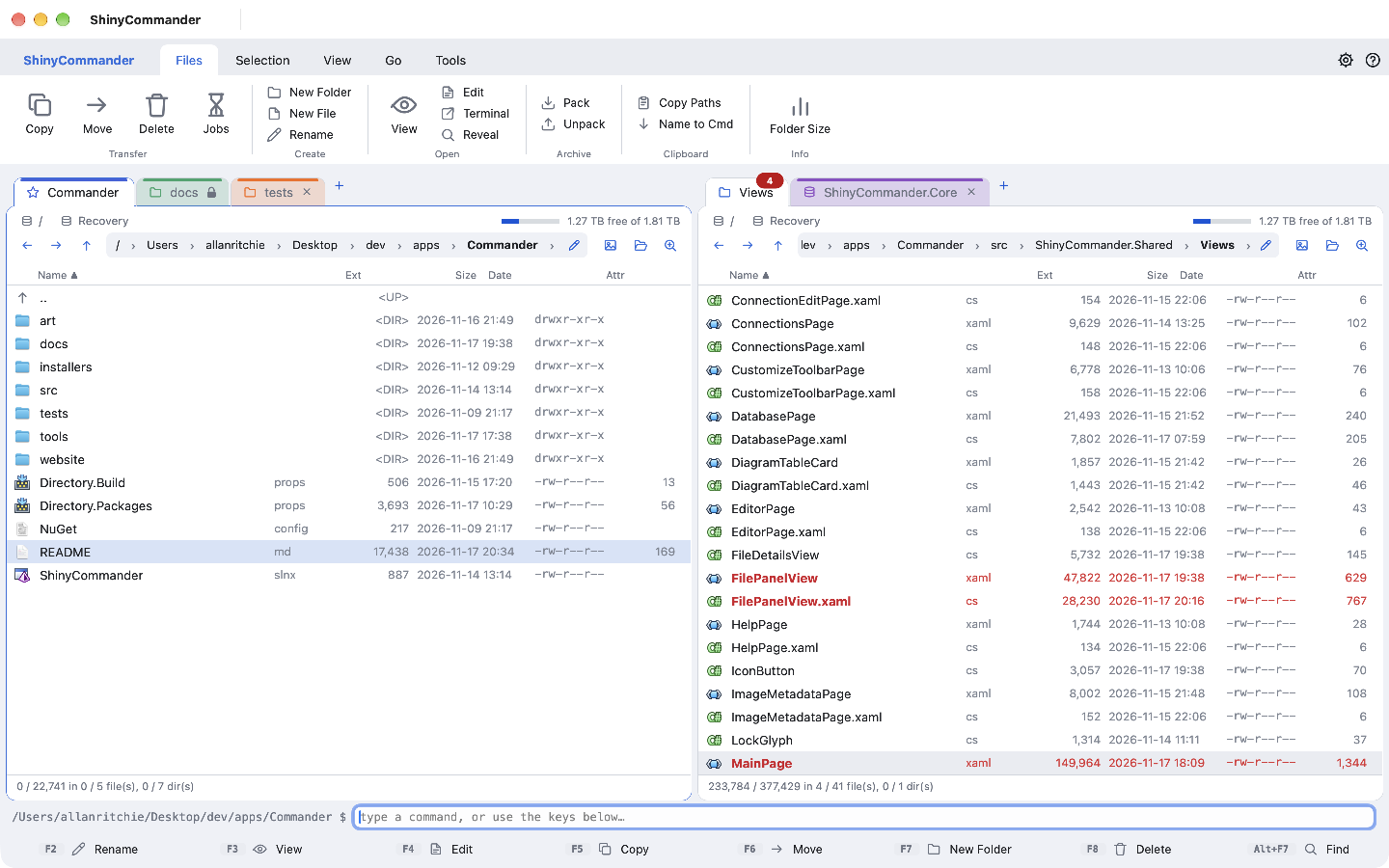
A modern, keyboard-first, dual-pane file manager in the spirit of Total Commander, for Windows, macOS and Linux. It’s the biggest of the three and the one that pushes the most Shiny libraries.
What it does
- Dual panels, side by side or stacked, with folder tabs you can lock, rename, colour and give an icon, and breadcrumbs where each crumb drops down its subfolders
- The full Total Commander keymap: F2–F8, Insert/Space marking, Alt+F7, Ctrl+B/R/H/T/W/U/D and the rest
- Archives as folders: zip, 7z and tar (gz, bz2, zst) opened with Enter and changed in place, including editing a file inside one with F4. 7z is written by a built-in writer
- Background jobs for copy, move, delete, pack and unpack, with live progress, and the computer kept awake while they run
- A preview panel for images, Markdown, HTML, PDF, SQLite tables, audio and video, and Word, Excel and PowerPoint files
- F4 editors by file type: text, Markdown with live preview, a SQLite database editor with a table designer and schema diagram, and a lossless EXIF editor for photos
- Custom columns read from inside the files: camera, lens and GPS for photos; artist, album and bitrate for music; page counts for documents
- Remote connections: SFTP, FTP/FTPS, Amazon S3 (and MinIO, R2, Wasabi, B2) and Azure Blob storage
- Serve a folder: share the folder under the cursor over HTTP and WebDAV to your network, or to the internet through a public tunnel, with keys, expiry, speed limits, resumable uploads and a QR code
- Multi-rename with live preview, directory sync, find files, and English, French and Spanish
How Shiny builds it
- Ribbon, MotionIconView, DataGrid, TableView, ImageEditor, dialogs, toasts, pills and badges from
Shiny.Maui.Controlsmake up most of the UI. - Keyboard Shortcuts declare the whole TC keymap once.
Primarymeans ⌘ on a Mac and Ctrl elsewhere,Shiny.Maui.Controls.Desktopsupplies the AppKit and GTK keyboard sources, and F1 help is generated from the live shortcut registry. - MarkdownView and MarkdownEditor in the lister, F1 help and the Markdown editor.
- Diagram draws the database editor’s schema; dragging between two tables adds a foreign key.
- MediaElement plays audio and video in the preview panel, and the Office viewers render Word, Excel and PowerPoint.
- Shiny.Net.HttpServer is the folder server: WebDAV, tus resumable uploads, the SSH tunnel for a public address and the mDNS listing. The page a share opens in is a Blazor WebAssembly app embedded in the server assembly.
- Shiny.Net.Discovery finds SMB, SFTP, WebDAV and FTP servers on the network.
- Shiny.Maui.Shell for ViewModel-first navigation with source-generated routes, Shiny.Mediator events between panels, Stores for
[Bind]settings, DI for[Singleton]registration and the Localization Generator for strongly typed strings from the.resxfiles.
Commander is also the app with the most serious test setup: xUnit v3 for the core, and a UI suite that drives the real macOS app through DevFlow without ever touching your desktop or your settings.
Notcho

Website (try it in your browser) · GitHub · Download
Notcho Notcho Man! We got all the “fixins”. (Formerly Shiny Notch; old installs update and rename themselves.)
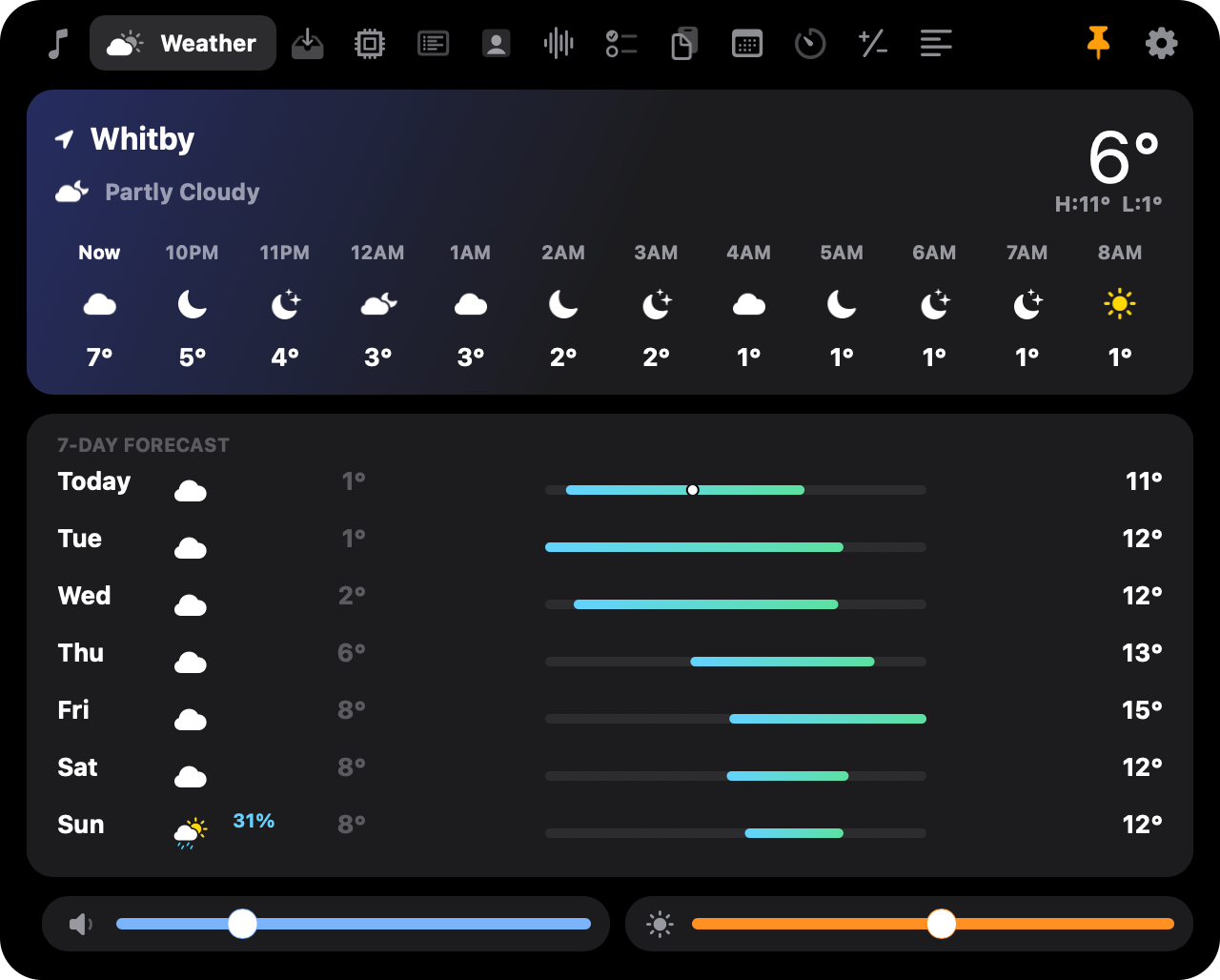
Notcho turns the MacBook camera notch into a live panel. Hover the notch and it opens; move away and it folds back into the camera. While closed, it peeks out either side of the camera with what’s playing, your system readings, a running timer, the next meeting or the weather.
What it does
- Now Playing for Apple Music and Spotify, tinted with the artwork’s colour
- Weather like the iOS widget: now, the next twelve hours and the week (from Open-Meteo, no API key)
- File Tray: drop files on the notch to shelve them, then copy, AirDrop or open them
- System and Processes: CPU, GPU, memory, network and disk, and the busiest processes with force quit
- Mirror: your camera, with looks (Mono, Noir, Sepia, Vivid…), photos, and a QR reader that offers to open links it sees
- Voice Notes, Tasks, Clipboard history, Calendar, Timer, Calculator and a Teleprompter that scrolls your script right under the lens
- Keep Awake, like Amphetamine or Caffeine
- Volume and brightness HUD, and notch styles in black, a colour, a gradient or frosted glass
- Capture shortcuts into macshot
How Shiny builds it
- NotchView is the black surface that grows out of the camera housing and morphs between the peek, the panel and the HUD.
INotchWindowServiceinShiny.Maui.Controls.Desktopprovides the borderless window, hover tracking and the camera cut-out’s size. - File drop feeds the tray, and Quick Entry is the popup tasks are typed into, because the notch window can never take keyboard focus.
- CameraView runs the mirror, and its barcode analyzer spots the QR codes.
- MotionIconView draws the music bars, and TableView is the Settings page.
- Shiny.Audio records voice notes from the microphone you pick, and plays them back.
- Shiny.Calendar reads every calendar for the Calendar tab and the “meeting soon” peek, with permissions through Shiny.Core.
- Shiny.Core’s
IAppStartupInstallerhandles open at login as anSMAppServicelogin item, including the “needs approval” and “turned off in System Settings” states. - Stores keeps settings in
NSUserDefaults, and DI registers each head’s platform services.
Notcho is also a lesson in low power: nothing polls while nothing changes. Music and Spotify announce track changes, CoreAudio reports volume, and the clock only ticks every second while something on screen counts seconds.
FileServe
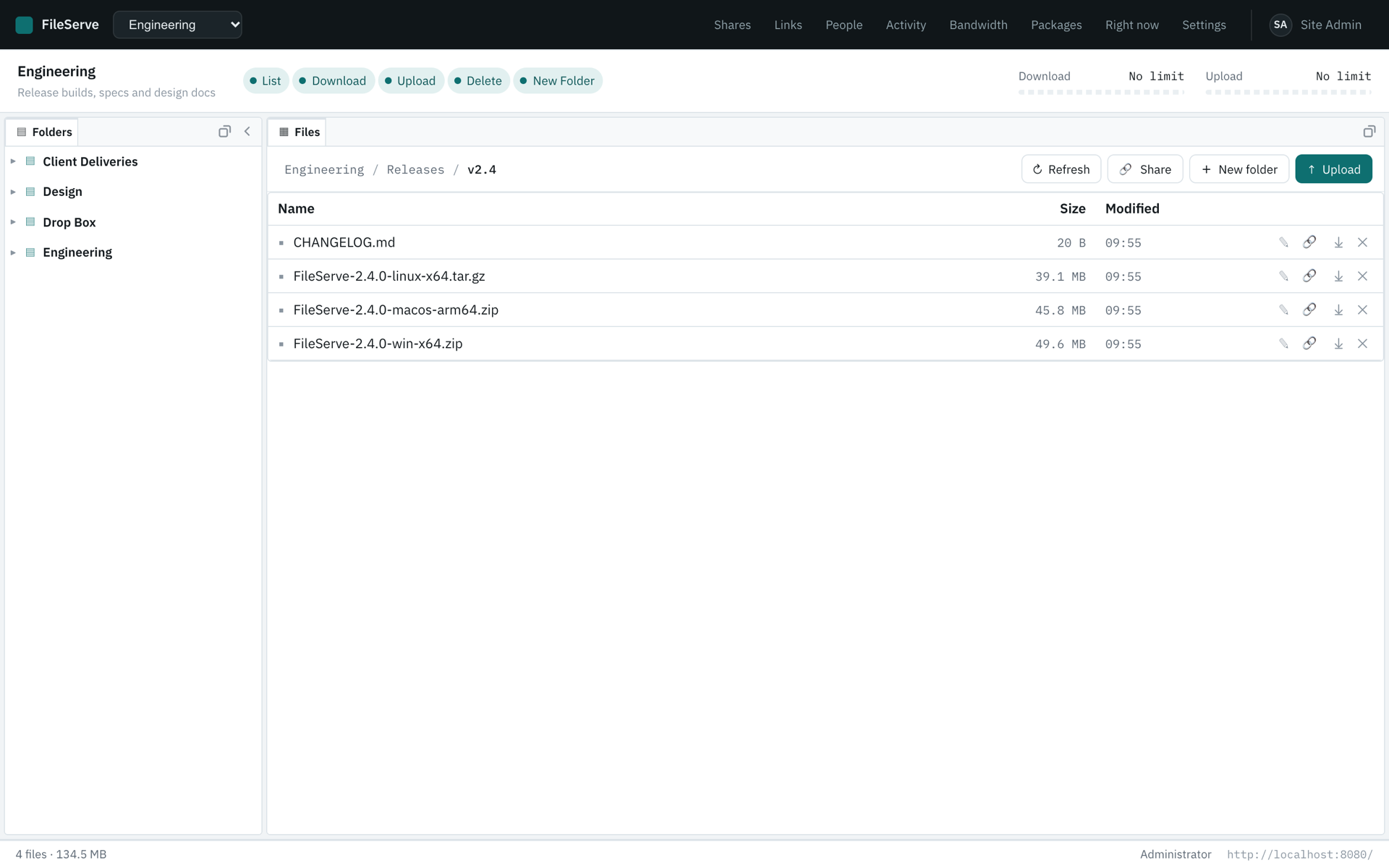
A self-hosted file server for a team. It sits in the system tray on macOS, Windows or Linux and serves a browser portal, so nobody has to install a client. The desktop app has no screens of its own: it’s a window onto its own server, so every form exists once.
What it does
- Shares publish folders on the machine to groups with explicit permissions: list, download, upload, delete and new folder
- Metered quotas per group per share and per account, over a day, week, month or in total
- An audit log of every sign-in, transfer and refusal, a Right now screen of who is signed in and what’s moving, and a Bandwidth report by account
- Share links for anyone with the address or for particular accounts, with expiry and a photo gallery for folders
- Virus scanning before an upload is published: AMSI (Defender) on Windows, ClamAV everywhere
- A private NuGet feed and npm registry with personal access tokens, governed by the same groups
- An optional public tunnel for people off the LAN, password policies, account lockout and expiry, anonymous accounts, desktop notifications, and backup and restore
Desktop app (.NET MAUI)          tray icon · console window
├── Shiny.Net.HttpServer  ───────  HTTP on every interface
│     ├── .NuGet / .Npm   ───────  /nuget feed, /npm registry
│     ├── AppDeviceBridge ───────  serves the Blazor portal
├── Shiny.DocumentDb      ───────  one SQLite file: users, groups,
│                                  shares, quotas, log, bandwidth
├── AppDeviceBridge.Tunnel ──────  optional public https
├── Shiny.Notifications   ───────  desktop notification per event
└── Shiny.Core            ───────  start at login, per platform
How Shiny builds it
- Shiny.Net.HttpServer is the whole server, running inside the MAUI app with no ASP.NET Core: routing, middleware, cookie authentication and host filtering against DNS rebinding.
- Shiny.Net.HttpServer.NuGet and .Npm host the package feeds at
/nugetand/npm. - Shiny.AppDeviceBridge serves the Blazor WebAssembly portal straight out of an embedded zip, with signed over-the-air frontend updates so the portal can change without an app release.
Shiny.AppDeviceBridge.Tunnelopens the public address. - Shiny.DocumentDb keeps everything in one SQLite file, with source-generated JSON and no reflection fallback, so the trimmed release build is safe. Backups are taken live while the server is serving.
- Shiny.Blazor.Controls draws the portal: DataGrid with server-side sort and paging for activity, people and links, PasswordStrength loaded with the server’s own rules, TreeView for picking folders, plus dialogs and toasts.
- Tray icon from
Shiny.Maui.Controls.Desktopon all three desktops, turning green while someone is connected. - Shiny.Notifications (with
Shiny.Notifications.Linux) sends a desktop notification for the events you choose. - Shiny.Core’s
IAppStartupInstallerhandles start at login: aRunregistry value on Windows, anSMAppServicelogin item on macOS, an XDG autostart entry on Linux. One API, no per-head code.
What building these taught the libraries
Shipping real apps is the best bug report there is. A few things that came out of these three:
- Desktop controls. The Ribbon, desktop keyboard shortcuts, NotchView, the tray icon, Quick Entry and file drop all exist because one of these apps needed them.
IAppStartupInstaller. Notcho and FileServe both needed open at login on three operating systems, and both needed to tell the user why it didn’t take. That became one API in Shiny.Core with an honest state enum instead of a boolean.- An embedded HTTP server that’s actually complete. Commander’s folder sharing and FileServe’s whole product run on Shiny.Net.HttpServer, which is why it grew WebDAV, tus, tunnels, NuGet and npm feeds, and host filtering.
- AppKit and GTK4 quirks. The maui-labs backends are previews, and these apps found their edges: trigger setters that don’t restore, children added to an on-screen layout that never get native views, status items that only appear if created before the first window. Each README documents the workarounds, and the fixes go back upstream.
Try them
- Shiny Commander: Website · GitHub · Download
- Notcho: Website (live demo) · GitHub · Download
- FileServe: Website · GitHub · Download
- .NET MAUI Labs: GitHub · AppKit backend · GTK4 backend · DevFlow
- Shiny: All the apps built with Shiny · Controls · GitHub
All three were built by my company, ShinySoft Technologies. If you want something like them for your own product, get in touch. And if you build something with Shiny, tell me about it. I’d love to list it.
comments powered by Disqus