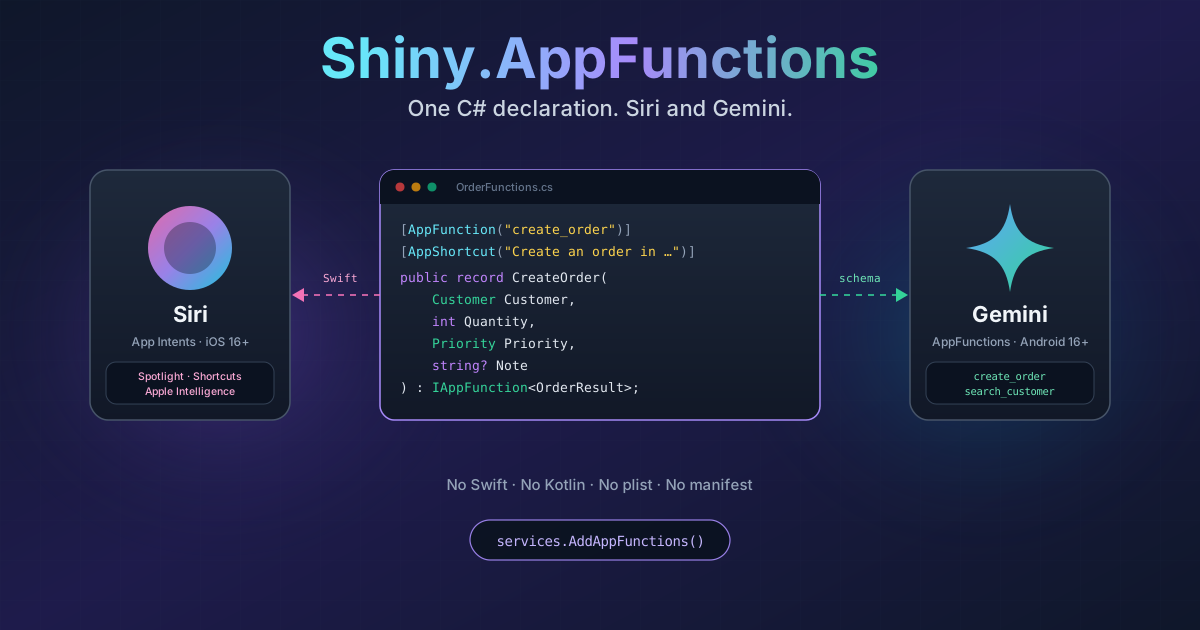
Shiny.AppFunctions — Siri and Gemini, From One C# Record
On this page
“Hey Siri, create an order in Orders.” “Ask Gemini how many orders are still open.”
That’s where phones are going. The assistant is turning into the front door, and the apps that get used are the ones it can actually do something with. Apple has App Intents, which feed Siri, Spotlight, Shortcuts and Apple Intelligence. Google shipped AppFunctions in Android 16, which is how Gemini and other agents call into an app.
Here’s the problem if you write .NET apps. Those two APIs have nothing in common.
App Intents are Swift, and a lot of the work happens at compile time: Xcode pulls metadata out of your Swift types and trains the Siri phrases before the app is signed. AppFunctions are Kotlin, an XML schema and a bound service. iOS lets Siri show a picker for “which customer?”; Android has no such thing and expects the agent to send an id. Siri has voice phrases; Gemini works from descriptions.
So “let the assistant create an order” becomes two features in two languages, neither of which your app is written in, and they start drifting apart the day you ship them.
I didn’t want to write it twice. So I built Shiny.AppFunctions.
Where this lives
 Shiny.AppFunctionsThe runtime, the source generator and the build step — all in one package.Shiny.AppFunctions.Extensions.AIThe same functions as tools for your own in-app LLM.
Write it once
Here’s the whole thing, for both platforms:
[AppFunction("create_order", Description = "Creates an order for a customer")]
[AppShortcut("Create an order in ${applicationName}", ShortTitle = "New Order", SystemImage = "cart.badge.plus")]
public record CreateOrder(
    [property: AppParameter(Title = "Customer", Description = "Who the order is for")] Customer Customer,
    int Quantity,
    Priority Priority,
    string? Note
) : IAppFunction<OrderResult>;

public class CreateOrderHandler(OrderStore store) : IAppFunctionHandler<CreateOrder, OrderResult>
{
    public Task<OrderResult> Handle(CreateOrder request, AppFunctionContext context, CancellationToken cancellationToken)
    {
        if (request.Quantity is < 1 or > 1000)
            throw new AppFunctionException(AppFunctionErrorCode.InvalidArgument, "Quantity must be between 1 and 1000");

        var order = store.Create(request.Customer, request.Quantity, request.Priority, request.Note);
        context.Say($"Order {order.Number} is in.");
        return Task.FromResult(new OrderResult(order.Number, order.Quantity, order.Total));
    }
}
And the registration:
builder
    .UseMauiApp<App>()
    .UseShiny();

builder.Services.AddAppFunctions();
A record is the function, and its properties are the parameters. A handler runs it, with DI, in its own scope, like
anything else in your app. The description is what Siri and Gemini read when they decide whether to call it. The
Say text is what Siri speaks back. The exception message is what the user hears when it fails, so I write it for
them.
From that, on iOS, you get a real App Intent — Siri, Spotlight, Shortcuts and Apple Intelligence can all see it,
and because of [AppShortcut], “Create an order in Orders” works the moment the app is installed. No setup by the
user. On Android 16, you get an AppFunction with a proper schema, callable by Gemini and whatever other agents the
system lets in. Same id, same parameters, same handler.
You don’t write the Swift. Or the Kotlin. Or the plist.
This is the part I’m happiest with. A Roslyn source generator reads your records and writes:
AddAppFunctions(), with every handler, entity query and delegate registered;- reflection-free binding, dispatch and result writing — so it’s trim- and AOT-safe;
- the Swift App Intents, App Entities, entity queries and the
AppShortcutsProvider; - the Android AppFunctions schema.
Then the package’s build targets pick it up. On iOS they run swiftc to compile the intents into your app, and run
Apple’s own App Intents metadata and Siri phrase processors before signing — the same steps Xcode runs. On Android
the schema goes in as assets and the service comes in through the manifest merger.
No Swift file. No Kotlin file. No Info.plist entry, no entitlement, no manifest edit. You need Xcode installed for the iOS build, and that’s it.
The hard part: “which customer?”
Most real functions aren’t “count something”. They’re “do something to that thing”. Create an order for Acme. Play that playlist.
Apple and Google disagree completely here, and it’s where one declaration earns its keep:
[AppEntity("customer", Title = "Customer")]
public record Customer(string Id, string Name, string City);

public class CustomerQuery(ICustomers customers) : IAppEntityQuery<Customer>
{
    public Task<IReadOnlyList<Customer>> GetByIds(IReadOnlyList<string> ids, CancellationToken ct) => customers.ByIds(ids, ct);
    public Task<IReadOnlyList<Customer>> Search(string text, CancellationToken ct) => customers.Search(text, ct);
    public Task<IReadOnlyList<Customer>> Suggested(CancellationToken ct) => customers.Recent(ct);
}
On iOS, that becomes a native App Entity. Siri and Shortcuts show a proper picker — your recent customers first, then search results as the user types.
On Android, there’s no picker and no entity query at all. So Shiny generates a companion function,
search_customer, from the same query. Gemini calls it to find Acme’s id, then calls create_order with that id.
You didn’t write that function; you just described how to find a customer once.
Either way, the id comes back through your query and your handler gets a real Customer.
Assistants don’t know if you’re signed in
An assistant can try to cancel an order when nobody is signed in. So every call goes through delegates first:
public class SignInDelegate(IAuth auth) : IAppFunctionDelegate
{
    public Task<AppFunctionGate> OnInvoking(AppFunctionContext context, CancellationToken ct)
        => Task.FromResult(context.FunctionId == "cancel_order" && !auth.IsSignedIn
            ? AppFunctionGate.OpenApp("Sign in to cancel orders.")
            : AppFunctionGate.Allow);
}
Deny just says no. OpenApp is nicer on iOS: Siri asks the user to continue in the app, then runs the call again in
the foreground. Android doesn’t have that flow, so there it refuses with your message. There’s an OnInvoked too,
which sees every result and exception — and context.Platform tells you whether it was Siri or Gemini, which is the
first thing I wanted in my telemetry.
And then I realised I had a tool registry
Once every function is a typed record with a description, you’ve basically described your app to an AI. So the same pipeline is available in-process:
var outcome = await dispatcher.Execute(
    new AppFunctionInvocation("create_order"),
    """{"customer":"acme","quantity":2,"priority":"Normal"}""",
    CancellationToken.None
);
And from there it was one small step to a package: Shiny.AppFunctions.Extensions.AI hands the same functions to
any IChatClient as tools.
builder.Services.AddAppFunctionAITools(b => b.AddAllFunctions());

var tools = sp.GetRequiredService<AppFunctionAITools>().Tools;
Now your own in-app assistant is a third caller of the same handlers, without declaring anything a third time. It goes through the same delegates, so the sign-in check that stops Siri stops your chat too. And it drops in next to Shiny’s Calendar, Contacts, Notifications and Locations AI tools, so one conversation can check your calendar, find a contact and create an order.
Things to know
- iOS 16+ and Android 16+ only. Below Android 16 it quietly does nothing.
- Functions must be declared in the app project — the generator doesn’t scan class libraries.
- Titles and descriptions aren’t localized yet.
Try it
The sample is a small orders app: create, count, look up and cancel, a customer entity, two Siri phrases and a sign-in delegate. It has a page that lists every call Siri or Gemini made.
The docs cover the rest: supported types, error mapping, build properties and the compile-time diagnostics that catch a missing handler or a bad Siri phrase before you ever deploy.
Write it once. Let both assistants in.