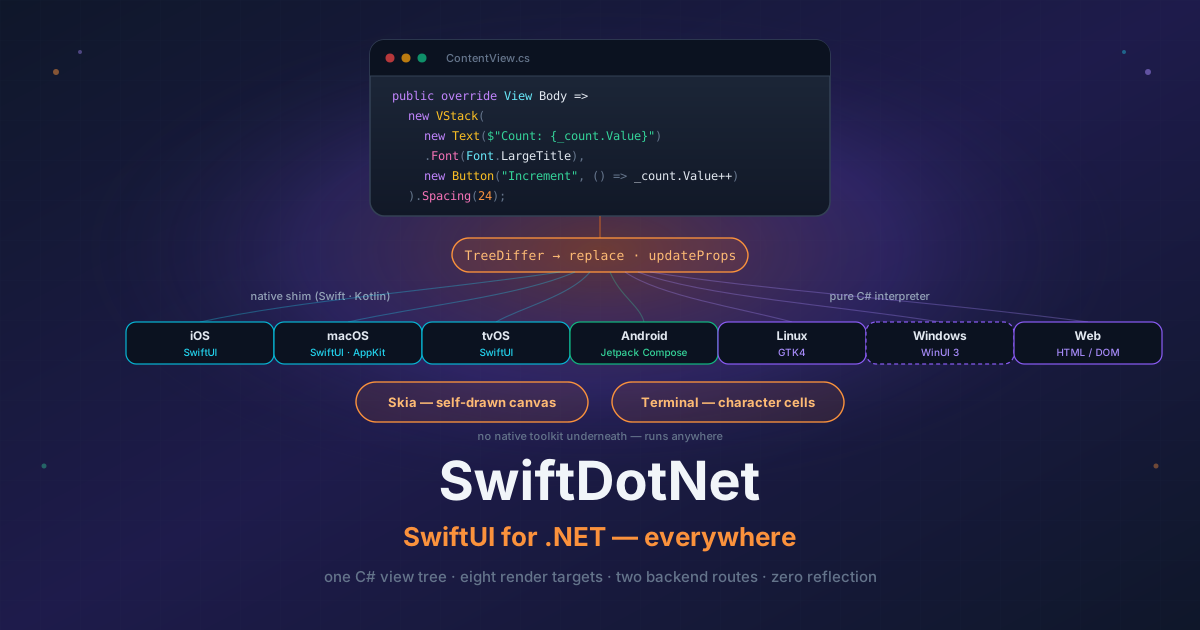
SwiftDotNet — It Started With "What If I Could Just Write SwiftUI in C#?"
On this page
Every cross-platform UI framework I’ve ever used asks you to accept the same trade: you write once, and in exchange you render as approximately native. Close enough. Nearly right. The button that’s the correct shape but the wrong height, the animation curve that isn’t quite Apple’s, the accessibility tree that a screen reader has to guess at.
I’ve made peace with that trade plenty of times. But I keep looking at SwiftUI, and I keep having the same thought — the one that starts every project like this:
I like this shape. I do not like leaving C# to get it.
That’s it. That’s the whole origin. This post is what happened next, which turned out to be considerably more than I bargained for. The repo is at github.com/shinyorg/SwiftDotNet.
Part 1: the wall everybody hits
The first idea was the obvious one — bind SwiftUI from C# the way we’ve bound UIKit for fifteen years.
That doesn’t work, and it’s worth understanding exactly why it doesn’t work, because the reason is the thing the whole framework is built around.
SwiftUI is not a library. It’s a compiler-plugin framework. @ViewBuilder is a result builder the Swift
compiler expands at build time. @Observable is a macro that rewrites your type. some View is an opaque
return type resolved statically. There is no runtime object graph sitting there waiting for you to poke it
from another language — the shape of your UI is a compile-time artifact of the Swift compiler. You cannot
author a SwiftUI View from outside the Swift compiler, and no amount of P/Invoke changes that.
So binding is off the table. But then the second thought arrived, and it’s the useful one:
You don’t have to author SwiftUI. You have to describe it, and let Swift do the authoring.
That’s the React Native trick, and it’s older than React Native. C# owns the view tree. Swift owns a tiny interpreter that reconstructs real SwiftUI from a description of that tree. The two talk over a C ABI.
Which gets you this, and this renders as actual SwiftUI on an iPhone:
public sealed class ContentView : View
{
    readonly State<int> _count = State(0);      // mirrors @State private var count = 0

    public override View Body =>
        new VStack(
            new Text($"Count: {_count.Value}").Font(Font.LargeTitle),
            new Text("Tap the button to increment").Font(Font.Caption).ForegroundColor(Color.Secondary),
            new Button("Increment", () => _count.Value++)
        ).Spacing(24);
}
Not a UIKit approximation with a SwiftUI-ish API on top. A real VStack, a real Text, a real Button,
laid out by Apple’s layout engine, animated by Apple’s animation system, read aloud by Apple’s
accessibility stack. _count.Value++ runs on the C# side and the change makes its way over as a patch.
(And yes — if that snippet made you think “this is Comet”, you’re right, and I say so at length further down. The short version is: very much like Comet, but without the MAUI underneath.)
The Swift side is three C functions and a lot less code than you’d think:
swiftdotnet_render(json)                 // C# pushes a patch; Swift applies it to an @Observable VNode tree
swiftdotnet_set_event_callback(fn)       // Swift calls back with a node id + optional value
swiftdotnet_make_host_controller()       // hands back a UIHostingController for C# to host
Ship that as an xcframework, resolve it with DllImport("__Internal") — the framework is a load-time
dependency, so its @_cdecl symbols land in the global namespace — and you have SwiftUI from C#.
At this point I had a fun weekend project and a demo that made two people say “huh.”
Part 2: “hang on, Compose is exactly the same problem”
Here’s where it stopped being a weekend project.
Jetpack Compose is also a compiler-plugin framework. @Composable is a Kotlin compiler plugin. Recomposition
is generated code. You cannot author a @Composable from C# for exactly the same reasons you can’t author a
SwiftUI View from C#. Identical wall.
Which means: identical solution. A Kotlin shim instead of a Swift one. An .aar instead of an
xcframework. JNI instead of P/Invoke. mutableStateOf VNodes instead of @Observable ones.
And then the part that actually mattered — I built the Compose bridge, pointed the sample app at it, and
didn’t change a single line of the C# side. Same ContentView. Same State<int>. Same patches on the
wire. It came up on the emulator as real Jetpack Compose.
That was the moment the project changed shape. Because if the C# side didn’t care whether the other end of the pipe was Swift or Kotlin, then the C# side didn’t care what was on the other end of the pipe at all.
Part 3: the shim was never the product
Here’s the realization the rest of the framework falls out of.
A backend is not “a native shim.” A backend is anything that can apply three patch operations and raise an event by node id:
replace       — swap a whole subtree
updateProps   — one node's props changed
setChildren   — this parent's child list changed
Swift and Kotlin need a native shim because their toolkits are compiler-locked. But GTK4 is a C/GObject library — fully bindable from C# through Gir.Core. WinUI 3 is fully bindable from C#. And the DOM, via Blazor, is already C#.
None of those need native code at all. They need a retained-mode interpreter written in C# that maps the node tree onto real widgets and applies the same three patches.
So SwiftDotNet ended up with one Core and two backend routes:
| Route | Why | Backends |
|---|---|---|
| Native shim | The toolkit is compiler-plugin-locked; C# can’t author it | iOS / macOS / tvOS (Swift), Android (Kotlin) |
| Pure C# interpreter | The toolkit is C#-bindable; no native code needed | Linux/GTK4, Windows/WinUI 3, Web/DOM, Terminal, Skia |
And the DSL, State<T>, Node, TreeDiffer, the patch protocol and SwiftApp are shared verbatim
across every one of them. Only the leaf renderer differs.
The Web one is my favourite piece of leverage in the whole codebase. SwiftDotNet.Web is a Razor class
library whose SwiftDotNetView : ComponentBase walks the node tree in BuildRenderTree and emits HTML
through Blazor’s RenderTreeBuilder. Which means Blazor’s own render-tree diff is the write layer — I
never touch the DOM. VStack → a flex div, TextField → <input>, Toggle → a checkbox, modifiers →
inline CSS, onclick → back into C# via EventCallback. The entire framework and your UI run in the
browser under WebAssembly.
Why node ids are paths
The diff engine is deliberately boring, which is the point. Node ids are structural paths — "0.2.1"
means root → child 2 → child 1 — so they’re stable across renders without any bookkeeping:
- a prop changed →
updatePropson exactly that node - a child list changed →
setChildrenon the parent - nothing changed → nothing is sent
Two-way-bound controls (TextField, Toggle) are controlled components on the backend side, whose local
state syncs both directions. And keyed Lists emit setChildren when the child key sequence changes, so
a reorder is one patch instead of N in-place prop updates.
Part 4: the detour that ate a week — Skia
Once “a backend is just an IBridge” was true, an uncomfortable question showed up:
What if the backend doesn’t map to a native toolkit at all? What if it just… draws it?
I want to be clear about what this actually meant, because I underestimated it badly. Every other backend is a translator — it hands the hard problems to a toolkit that already solved them. A self-drawing backend has no toolkit. It owns everything:
- two-pass measure/arrange layout for every view and modifier
- text shaping through HarfBuzz, with per-run font fallback via
SKFontManager.MatchCharacter(so emoji and CJK render instead of tofu) - scrolling, clipping, scrollbars
- overlays — nav bar, push transitions, bottom sheets, modal alerts, menu popovers
- focus, hit testing, an animation clock, an icon font, light and dark themes
That’s not a renderer. That’s a UI toolkit, in the Flutter/Avalonia sense, and it renders the entire shared
sample identically on every OS. It exists for two honest reasons: a pixel-identical look everywhere, and
targets the native backends can’t reach — dependency-free desktop, embedded/framebuffer Linux. The trade is
real and stated: no native accessibility, and WebView/Map can’t be painted onto a canvas.
It runs on four hosts today: a headless PNG harness, an interactive AppKit NSView on macOS, a Silk.NET/GLFW
window (dependency-free desktop), and a MAUI adapter that composes with Shiny — .UseSkiaSharp().UseShiny(),
one DI container shared between the Skia UI and the Shiny plugins.
The lesson I’d tattoo on something
The Skia backend taught me the single most useful sentence in the repo:
A control that renders is not a control that works.
Here’s how I learned it. There’s a real controls library on top of this thing (Part 7), and seven of its
controls depend on continuous gestures — Slider, RangeSlider, ColorPicker, FloatingPanel,
SwipeContainer, ReorderableList, ImageViewer. On every other backend those inherit the toolkit’s gesture
recognizers for free. A self-drawing backend has none.
So all seven rendered perfectly and did absolutely nothing. Screenshot review passed. Every visual diff was clean. The controls were inert.
Same category of bug, three more times:
| Symptom | Cause |
|---|---|
A long Form couldn’t be scrolled at all on touch |
Scrolling only ever arrived via Scroll(point, dy) — which a host raises from a mouse wheel. A phone doesn’t have one. |
| Dragging a slider left it exactly where it started | The built-in Slider was tap-to-set only, and passing the tap slop also cancelled the tap. Worse than “drag does nothing.” |
| Tapping a text field blinked a caret and raised no keyboard | A canvas cannot raise an IME. Only a focused native input can. |
The fixes are all in the repo now — a SkiaPointerRouter
that resolves a raw pointer stream into tap / long-press / swipe / drag / pinch in order of specificity, and
for the keyboard, a 1×1 transparent Entry sitting behind the canvas that gets focused whenever the engine
focuses a text control:
bridge.FocusChanged += id => { … id is null ? entry.Unfocus() : entry.Focus(); };  // engine → IME
entry.TextChanged  += (_, e) => bridge.SetFocusedText(e.NewTextValue ?? "");        // IME → engine
Text crosses as the whole string, not keystrokes — the only form that survives autocorrect, dictation, paste and selection edits.
And a gotcha that cost me an evening and that I’d like to save you: that shadow entry must not be
InputTransparent. On iOS that maps to UserInteractionEnabled = false, and a view that can’t be interacted
with can’t become first responder — Focus() silently returns false and no keyboard ever appears. Android
allows the programmatic focus either way, so it fails on exactly one platform.
Part 5: the punchline — a backend with no pixels at all
Skia answered “what if the backend has no toolkit?” So the obvious next question was rude:
What if it has no pixels?
Today I pointed the same ContentView at a terminal. Not a logging view of it. The actual UI — nav
stack, sections, text fields, toggles, sliders, dialogs — drawn as characters in a TTY. Over SSH, in a
container, on a box with no display server at all.
XenoAtom.Terminal.UI turned out to be the right substrate: it’s a
retained-mode, bindable widget toolkit — two-pass measure/arrange layout, routed events, focus, themes —
not a compiler-plugin framework. Which puts it squarely on route two. No shim, no native code, one more
IBridge implementation, and all 40 node kinds mapped onto real terminal controls: Section → a captioned
box, DisclosureGroup → Collapsible, TabView → TabControl, Sheet and Alert → real modal dialogs,
NavigationStack → a title bar over a content switcher with Esc-to-pop.
Here are two sections of the shared sample’s flyout menu — same ContentView, not a word of it changed,
narrowed here to fit the page:
┌ Controls ───────────────────────────────────────────────┐
│                    🔤 Text & Input  ›                    │
│                  ⋮ Values & Steppers  ›                  │
│                        ★ Rating  ›                       │
└─────────────────────────────────────────────────────────┘

┌ Layout ─────────────────────────────────────────────────┐
│                    ▦ Shapes & Grid  ›                    │
│                  ▤ Stacks & Alignment  ›                 │
│                   ▭ Cards & Borders  ›                   │
└─────────────────────────────────────────────────────────┘
But what about images?
This is the question I actually wanted to answer, and it’s the most fun I’ve had in the repo.
A terminal cell is not a pixel — but it does have a glyph, a foreground colour and a background colour.
That’s more than one bit of information per cell, and you can spend it cleverly. So an Image node
downsamples to a cell grid and renders in one of three modes, picked from what the terminal admits to
supporting:
| Mode | The trick |
|---|---|
| HalfBlock (default) | One ▀ per cell, foreground = the upper half-pixel, background = the lower. Doubles your vertical resolution for free and keeps full colour. |
| Quadrant | 2×2 sub-cell sampling onto ▘▝▀▖▌▞▛▗▚▐▜▄▙▟█, splitting each cell’s four samples around their mean luminance. Doubles horizontal resolution too, at the cost of two colours per cell. Better for line art and logos. |
| Ascii | Luminance onto the ramp " .:-=+*#%@". The only one that survives a monochrome terminal or TERM=dumb. |
Two details that matter more than they sound like they should. Downsampling is a box average, not nearest-neighbour — at 20–60 columns, nearest-neighbour throws away most of the source and aliases into mush. And aspect ratio is corrected for the ~2:1 cell, so a square image comes out square instead of twice as tall as it is wide.
Terminals that speak Sixel or the Kitty protocol can do better than art, of course — real pixels. That path
exists too, and it’s where I made the one dependency decision I’d defend hardest: it’s a separate opt-in
package, because the library that provides it drags in SkiaSharp plus native assets for three desktop
RIDs. A terminal app that never shows an image should not pay tens of megabytes for the privilege. So the
core backend depends on exactly one package, ships a hand-rolled PNG decoder (System.IO.Compression
for the inflate, everything above it — chunk walking, bit unpacking, all five scanline filters — written
out), and stays trim/AOT-clean. Turn on the add-on and images become real Sixel/Kitty pixels with the
character art as their fallback content, so a terminal that can’t do graphics degrades on its own.
The backend that finally made testing possible
Here’s the thing I did not expect.
GTK and Web can’t be tested headlessly in CI — they need a display server and a browser. Skia can, which is why it’s far and away the most test-covered backend in the repo. But the terminal one is the easiest to write assertions for, because a terminal frame is just text. Render the visual tree into a cell buffer, read it back as markup, and you get something you can eyeball in a failure message:
[#ff0000 on #0000ff]▀[/]That’s one half-block cell: red on top, blue underneath. You can write an assertion against that. So the image pipeline has real tests — the half-block trick, the box averaging, alpha compositing against the theme background, the PNG decoder against fixtures encoded in the test itself.
And it immediately earned its keep. Three layout bugs were invisible to every type-level assertion I had — each control was correct, only the widths were wrong — and fell straight out the moment I rendered to an actual buffer:
| Symptom | Cause |
|---|---|
Every Section shrink-wrapped to its longest row; labels truncated mid-word |
The per-node wrapper I use to carry padding/background/border was swallowing its content’s stretch intent |
Spacer did nothing — left and right came out adjacent |
This toolkit resolves size by alignment before flex gets a say, so a shrink-wrapped stack gives a Spacer no slack to absorb |
Rectangle().Frame(80, 32) drew at its natural size inside a correctly-sized frame |
Shapes weren’t greedy. In SwiftUI they are. |
Which is Part 4’s lesson wearing a different hat: a control that renders is not a control that works — and sometimes you only find out when you can finally read the frame back.
Two traps, so you don’t pay for them
Both libraries are SwiftUI-shaped, which means both libraries use the same names. State<T>, Color,
Style, Theme, VStack, Button, Grid, Slider, Link, Rectangle — all of them exist twice. Add
using XenoAtom.Terminal.UI; to a file and every State<int> in your own views becomes an ambiguity error.
So the host takes a SwiftDotNet options type rather than the toolkit’s, and app code never has to import
the colliding namespace at all. Inside the backend, the one file where the two vocabularies meet aliases the
terminal side with a T prefix and a comment explaining why.
The second cost me a genuinely stupid amount of time. Slider<T> clamps and step-snaps on every write to
Value, against whatever Minimum/Maximum/Step happen to be set at that instant — and it defaults to
a 0–10 range with a step of 1. Which means the three-argument constructor is a trap:
new Slider<double>(0, 100, 42).Value // → 10. It applies Value before Maximum.Set the range, then the step, then the value. In that order, every time.
Part 6: when it stopped being a renderer and started being a framework
A view tree that reaches eight toolkits is a neat trick. It is not something you’d build an app in. The next stretch was the unglamorous stuff that decides whether anyone ever could.
Hosting and DI, deliberately shaped like MauiProgram.cs, because that’s the shape .NET developers
already have in their fingers:
public static class SwiftProgram
{
    public static SwiftDotNetApp CreateSwiftApp(Action<SwiftDotNetAppBuilder>? platform = null)
    {
        var builder = SwiftDotNetApp.CreateBuilder();

        builder.UseSwiftApp(_ => new SampleRootView());        // the root view

        builder.Services.AddSingleton<IGreetingService, GreetingService>();
        builder.Logging.AddDebug();

        platform?.Invoke(builder);                             // platform-only opt-ins
        return builder.Build();
    }
}
Every platform head is then one line — protected override SwiftDotNetApp CreateSwiftApp() => SwiftProgram.CreateSwiftApp(); — because the window/activity/activation wiring lives in the framework as
reusable abstract hosts.
Services reach views through [Inject] partial properties, filled by a source generator that emits plain
static assignments. No reflection, so it stays trim/AOT-clean under iOS AOT:
public sealed partial class WeatherView : View          // the type must be partial
{
    [Inject] public partial IWeatherService Weather { get; }   // required
    [Inject] public partial IImageCache? Cache { get; }        // nullable ⇒ optional
}
Global styles are the piece I’m quietly proudest of. SwiftUI has no stylesheet — “global styling” there is
the environment cascade, style protocols, and reusable ViewModifiers. SwiftDotNet offers the same three, but
resolves the cascade in C# during the render pass. Each node inherits any ambient font/colour/control-style
it didn’t set and ships to the backend fully resolved, using only modifier types the backends already
understand:
new ContentView()
    .Environment(e => e.Font(Font.Body).ForegroundColor(Color.Primary))
    .ButtonStyle(new FilledButtonStyle())
    .Theme(new Theme { Accent = Color.Hex("#7C4DFF"), CornerRadius = 16 });
Which means global styles work identically on every backend — including Skia, GTK and WinUI, which have no inheritance mechanism of their own — with zero per-backend code. An explicit local modifier always wins, and nothing is injected unless you set an environment, so it costs nothing when unused.
Part 7: there are real controls on this thing
A DSL that can do VStack and Button proves nothing. Anybody can ship a toy. The question that actually
decides whether a UI framework is real is: can you build serious controls on it without reaching back into
the framework every time?
So I tested that the only honest way — by porting the whole Shiny controls set onto it. That’s
SwiftDotNet.Controls, and
it is 28 real, non-trivial controls:
| Group | Controls |
|---|---|
| Data | TableView, TreeView, DataGrid, StaggeredGrid, ReorderableList, SwipeContainer, Cells |
| Input | Slider, RangeSlider, ColorPicker, DurationPicker, SecurityPin (PIN entry), AutoCompleteEntry |
| Feedback | Toast, Dialog, LoadingOverlay, SkeletonView, PillView, BadgeView |
| Surfaces | FloatingPanel, FrostedGlassView, Fab, FabMenu, ImageViewer |
| Big ones | ChatView, Scheduler (calendar grid + agenda timeline), ControlPalette |
DataGrid. TreeView with lazy loading. A Scheduler with a calendar grid and an agenda timeline. A
ChatView with bubbles and a typing indicator. These are the controls you actually ship products with, not
demo fodder.
And here’s the part that made me trust the architecture: every single one is a pure composite. Each is an
ordinary View whose Body lowers to core views the backends already draw. There is not one ctx.NewNode
call in the entire project. Zero new node kinds. Zero new backend code. I wrote DataGrid once, in plain C#,
and it renders on SwiftUI, Compose, GTK4, WinUI, the DOM, Skia and a terminal because it decomposes into
stacks, text, shapes and modifiers that all seven already understood.
That gives you a rule I now reach for constantly when triaging:
Backend support for the controls library is not a question about the controls at all. It is entirely a question of core modifier parity. When
ImageViewerdoesn’t zoom somewhere, the cause is always a missing.OnMagnify— never a missingImageViewer.
The single exception proves it. CameraView
is a genuine native primitive — you cannot compose a camera feed out of rectangles — so it’s a CustomView
that needs a registered per-backend renderer. It’s the one control in the set that knows what platform it’s
on, and it’s the one control that isn’t a composite. Those two facts are the same fact.
Writing your own control
So there are two doors, and picking the right one is most of the work.
Door one — a composite. Subclass View, compose existing views, done. No native code, and it renders on
every backend automatically because it decomposes into primitives the interpreters already know. This is the
door you want ~95% of the time:
public sealed class Rating : View
{
    readonly State<int> _value;
    public Rating(State<int> value) => _value = value;

    public override View Body =>
        new HStack(
            Enumerable.Range(1, 5).Select(i =>
                new Button(i <= _value.Value ? "★" : "☆", () => _value.Value = i)
                    .ForegroundColor(i <= _value.Value ? Color.Accent : Color.Secondary)
            ).ToArray()
        ).Spacing(4);
}
That’s the whole control. It works on SwiftUI, Compose, GTK4, WinUI, the DOM, Skia and a terminal, and it participates in global styles for free because it’s just views.
Door two — a native primitive. When the thing genuinely isn’t a composition — a real map, a hardware
gauge, a camera preview, a platform widget with no C# equivalent — you subclass CustomView instead. You
declare a TypeName, write the props your renderer will read, and register the event callback:
public sealed class NativeRating : CustomView
{
    readonly State<int> _value;
    public NativeRating(State<int> value) => _value = value;

    protected override string TypeName => "NativeRating";       // the renderer key, per backend

    protected override void Configure(CustomNode n) => n
        .Prop("value", _value.Value)                            // props the renderer reads
        .OnEvent(v => _value.Value = int.Parse(v!));            // events it raises back to C#
}
Note what this class does not contain: any platform code, any #if, any knowledge of who’s going to draw
it. It emits a node under a name. That’s the entire contract.
Now you fill in renderers per platform — and here’s where the two backend routes show up in your code, not just in mine.
On the pure-C# backends there is no native code and no interpreter fork. The registry is hooked into each interpreter’s default case, so you hand it a lambda that returns a real widget:
// Linux / GTK4 — a real Gtk.Scale
GtkRenderers.Register("NativeRating", ctx =>
{
    var scale = Gtk.Scale.NewWithRange(Gtk.Orientation.Horizontal, 0, 5, 1);
    scale.SetValue(ctx.Number("value") ?? 0);
    scale.OnValueChanged += (_, _) => ctx.Emit(((int)scale.GetValue()).ToString());
    return scale;
});

// Windows — WinRenderers.Register(type, ctx => FrameworkElement)
// Web     — WebRenderers.Register(type, WebRenderer delegate)
// Terminal — TuiRenderers.Register(type, ctx => Visual)
That last one does double duty on the terminal backend: it’s also how you reach the controls
XenoAtom.Terminal.UI ships that the DSL has no node kind for — Table, DataGridControl, TreeView,
CodeEditor, MarkdownControl, the chart family.
Skia is the interesting one, because it owns the pixels — so a renderer has to both Measure itself and
Paint itself. It’s the self-drawing analog of GTK’s create/update widget pair:
public sealed class RatingSkiaRenderer : ISkiaRenderer
{
    public SKSize Measure(SkiaRenderContext ctx, SKSize available) => new(5 * 26, 28);

    public void Paint(SkiaRenderContext ctx, SKCanvas c, SKRect r)
    {
        var value = (int)(ctx.Number("value") ?? 0);
        using var font  = new SKFont(SKTypeface.Default, 20);
        using var on    = new SKPaint { Color = SKColors.Orange, IsAntialias = true };
        using var off   = new SKPaint { Color = SKColors.Gray,   IsAntialias = true };

        for (var i = 0; i < 5; i++)
            c.DrawText(i < value ? "★" : "☆", r.Left + i * 26, r.Top + 20, font, i < value ? on : off);
    }
}

SkiaRenderers.Register("NativeRating", new RatingSkiaRenderer());
A trap I walked into:
SKTypeface.Defaulthas no emoji coverage. Text the engine draws goes through its font-fallback chain and renders emoji fine, but a custom renderer callingSKFont(SKTypeface.Default, …)directly paints tofu. Stars are fine; 🎉 is not. Resolve a fallback face or stay in the BMP.
And for the native-shim backends, you register from the native side — because SwiftUI and Compose have no per-control C# view to hand you in the first place. That’s the whole reason those two backends exist as shims:
// iOS / macOS / tvOS — real SwiftUI, registered from your app's Swift
swiftDotNetRegisterRenderer("NativeRating") { props in
    let value = Int(props.number("value") ?? 0)
    return AnyView(
        HStack(spacing: 4) {
            ForEach(1...5, id: \.self) { i in
                Image(systemName: i <= value ? "star.fill" : "star")
                    .onTapGesture { props.emit("\(i)") }
            }
        }
    )
}
// Android — a real @Composable, registered from your app's Kotlin
registerRenderer("NativeRating") { props ->
val value = props.number("value")?.toInt() ?: 0
Row {
(1..5).forEach { i ->
Icon(
imageVector = if (i <= value) Icons.Filled.Star else Icons.Outlined.StarBorder,
contentDescription = null,
modifier = Modifier.clickable { props.emit("$i") }
)
}
}
}Six renderers is a lot of typing, which is why door one is the default and this door is for things that genuinely need it. But the property that makes it pleasant rather than terrifying is the fallback:
An unregistered type renders a ⚠️ placeholder, not a crash.
So you ship the CustomView with one renderer, on whichever platform you actually care about today, and add
the rest whenever. The control shows up as an honest “not implemented here” box everywhere else instead of
taking the app down. That’s how Map shipped — it’s the canonical real example of this seam, with MapKit on
Apple, MapLibre on Web and Android, a hand-drawn one on Skia, and a placeholder anywhere I haven’t got to.
Part 8: …and the Skia renderers still have a ways to go
All 28 controls render on all eight backends. I want to be careful with that sentence, because after Part 4 you know exactly how much it isn’t saying.
Rendering is the easy half. What differs backend to backend is interaction and effects, and Skia — being the one with no toolkit underneath it — has the longest list of things that are drawn correctly and behave approximately. Straight from the audit table in the docs:
| Apple | Web | Compose | Skia | GTK | WinUI | TUI | |
|---|---|---|---|---|---|---|---|
| Continuous drag (7 controls) | ✅ | ✅ | ✅ | ✅ ¹ | ✅ | ✅ ² | ❌ ⁴ |
Pinch (ImageViewer) |
✅ | ✅ | ✅ | ✅ ¹ | ✅ | ✅ ² | ❌ ⁴ |
| Shimmer / pulse loop | ✅ | ✅ | ✅ | ✅ ³ | ✅ ³ | ❌ | ❌ |
| Real backdrop blur | ✅ | ✅ | tint | tint | tint | tint | tint |
CameraView |
✅ | ❌ | ❌ | placeholder | ❌ | ❌ | ❌ |
¹ Only if the host wires SkiaPointerRouter. A host that forwards only taps leaves all seven drag-driven
controls inert while looking perfectly correct. All three in-repo hosts are wired — yours wouldn’t be.
² WinUI is uncompiled and untested. ³ The wire carries no from/to pair, so a loop is always opacity 1 → 0.4:
BadgeView.Pulse reads as an opacity pulse rather than a size pulse, and SkeletonView’s shimmer fades
instead of travelling across the control. It looks fine. It isn’t what I wrote. ⁴ A terminal reports button
press/release and wheel — not drag paths, not pinch. Those are honest no-ops there, along with transforms,
shadows and animation, because a cell grid has nowhere to put them.
.Material blur is a translucent tint, not a real backdrop blur, so FrostedGlassView is frosted in
spirit only. And CameraView on Skia deliberately renders an honest viewfinder placeholder rather than faking
a feed — Skia has no capture stack, and without a registered renderer it would paint the generic “⚠️ unknown
view” box, which reads as a bug rather than as an unsupported capability.
Then there’s the engine’s own to-do list, which is not short:
- Accessibility. This is the real one. The Skia canvas is a single unlabelled rectangle to VoiceOver and
TalkBack. There is no accessibility tree, and building one means
UIAccessibilityContainer/ExploreByTouchHelperhost adapters on top of ten SwiftUI-style modifiers that also don’t exist yet. - Caret placement and text selection. The IME hands back the whole string, so every edit lands at the end. You cannot tap into the middle of a word and fix a typo.
- Keyboard avoidance. The engine has no idea how much of the canvas the soft keyboard is covering, so it doesn’t move anything out of the way.
- Fling, inertia and rubber-banding. Panning tracks your finger 1:1 and then simply stops. It’s correct and it feels wrong, because every native scroller you’ve ever touched has momentum.
WebViewandMap. Cannot be painted onto a canvas at all. They need a native-view punch-through overlay, which is planned and not built.- Dirty-rect repaint. Every frame repaints everything today.
None of that is hidden in a footnote in the repo either — the docs rule I hold myself to is that ✅ Verified
means actually run, and it says where. Skia is simultaneously the most thoroughly test-verified backend in
the project and the one with the furthest to go, and both of those are true because it’s the one that had to
build the toolkit rather than borrow one.
If you want the pixel-identical look or a target the native backends can’t reach, it’s genuinely there and genuinely usable today. If you want a screen reader to work, use a native backend and come back to this one later.
Part 9: hot reload showed up for free, and iOS made me work for it
I didn’t build hot reload. I built four properties that turned out to add up to it:
| Property | Why it matters |
|---|---|
The root View instance is retained for the app’s life |
An edit to Body is picked up with no re-instantiation |
Body is re-evaluated on every render |
The new code runs on the very next pass |
State<T> cells are fields on that retained instance |
State survives the reload — the SwiftUI-preview behaviour |
| Every backend consumes patches, not view objects | A reload is just a bigger patch; no backend knows it happened |
So the entire implementation is a [MetadataUpdateHandler] whose only job is to call SwiftApp.Invalidate(),
which drops the diff baseline so the next render emits one replace of the root instead of diffing against a
tree the old code built. dotnet watch run and you’re done — on every backend, with no custom file watcher,
no Roslyn step, no designer process. Measured at 45 ms end-to-end on Skia.
iOS, naturally, had opinions. Two of them.
First, the SDK hard-errors without the Mono interpreter. Fine, UseInterpreter=true.
Second — and this is the one that made iOS hot reload look impossible for a while — dotnet watch delivers
edits by injecting DOTNET_STARTUP_HOOKS pointing at the SDK’s Microsoft.Extensions.DotNetDeltaApplier.dll.
On iOS the Xamarin registrar only loads assemblies it knew about at build time, so a hook assembly living
outside the app bundle aborts startup:
mono_runtime_run_startup_hooks → xamarin_register_assembly → abortCopying the file into the .app is not enough. It has to be a referenced assembly. Both fixes go behind
one opt-in property so ordinary debug deploys aren’t silently switched to the interpreter, and then:
cd sample/SampleApp
dotnet watch run -f net10.0-ios --property:SwiftDotNetHotReload=true --device <SIMULATOR-UDID>
Edit a Body, save, and the running simulator app updates in place in 407 ms. No restart, state intact.
Two things that will waste your time if nobody warns you. The
Socket error while connecting to IDE on 127.0.0.1:10000 you’ll see on every simulator run is a red
herring — it’s the debug agent looking for an IDE and it’s non-fatal, including on runs that hot reload
perfectly. And use --property:Foo=Bar, not -p:Foo=Bar: dotnet watch reads -p as --project and will
tell you the project file Foo=Bar doesn’t exist.
Part 10: tooling, because eight backends is a lot of incantations
The last stretch was a Rider plugin, and the most useful thing in it isn’t the plugin — it’s the doctor.
Head discovery reads one declared MSBuild property (SwiftDotNetPlatform) rather than guessing from package
references, and swiftdotnet-doctor runs the plugin’s discovery, host-OS gate, device listing and launch
planning headlessly inside a real Rider process, then prints the exact command each head would run:
heads (13)
  ✓ SampleApp (net10.0-ios)
      backend  : Apple (SwiftUI)
      devices  : iPhone Air (499AF569-C96C-4E5E-9361-CCEF93410629)
      run      : dotnet build …/SampleApp.csproj -t:Run -f net10.0-ios -c Debug \
                 -p:SwiftDotNetHotReload=true -p:_DeviceName=:v2:udid=499AF569-…
…
13 of 13 head(s) runnable on macos
Copy-pasteable, and it exits non-zero when nothing is runnable so it doubles as a CI check. There’s also a patch inspector that reconstructs the live view tree from the patch stream — which works on every backend from one implementation, because every backend consumes the same patches — and a Skia preview that renders your views interactively in a tool window.
One deliberate design call in the plugin that I’d defend in a code review: heads this machine cannot build are shown greyed with the reason, not hidden. The platform matrix is the whole pitch. A Windows developer who can’t find the iOS head deserves to be told why, not left wondering if it exists.
“So it’s Comet, then?”
Yes, actually — and I’d rather say that plainly than have somebody say it for me in the replies.
The honest one-line pitch is: this is very much like .NET Comet, but without the MAUI.
.NET Comet is James Clancey’s SwiftUI-inspired C# UI toolkit, and it’s
the obvious prior art. If you squint at the authoring surface, the two are siblings — Text(...).Font(...),
VStack, State<T>, a Body that gets recomputed when state changes. If you’ve written Comet, you can write
SwiftDotNet this afternoon. That similarity is deliberate; SwiftUI’s shape is good and neither of us invented
it.
What’s underneath is where they part company, and every difference below traces back to a single decision:
Comet renders through .NET MAUI’s handler abstraction — a Comet
ButtonimplementsMicrosoft.Maui.IButtonand MAUI’s handler maps it to native. SwiftDotNet bypasses MAUI entirely and renders to each platform’s own toolkit directly, including the modern declarative ones (SwiftUI, Jetpack Compose) that MAUI predates and doesn’t use.
| .NET Comet | SwiftDotNet | |
|---|---|---|
| Rendering substrate | .NET MAUI handlers (implements Microsoft.Maui.IButton etc.); MAUI maps to native |
The platform’s own toolkit, directly |
| iOS output | UIKit, via a MAUI handler | Real SwiftUI |
| Android output | Android Views, via a MAUI handler | Real Jetpack Compose |
| macOS | Mac Catalyst (iOS-on-Mac) | Native AppKit-hosted SwiftUI |
| Update mechanism | MVU over MAUI’s in-process object graph | Structural-path diff engine → patch → native @Observable / mutableStateOf VNode tree across a C-ABI / JNI bridge |
| Backend routes | One — MAUI handlers, for everything | Two — native shim for compiler-locked toolkits, pure-C# interpreter for bindable ones |
| Dependencies | The entire MAUI stack | Core is dependency-free, platform-neutral C#; each backend pulls only its own toolkit |
| Platform reach | Wherever MAUI runs: Windows, Android, iOS, macOS (Catalyst), Blazor | iOS, tvOS, native macOS/AppKit, Android, Linux/GTK4, Windows/WinUI 3, Web/DOM, plus a self-drawing Skia renderer and a terminal one |
| Linux | Not a MAUI target | Real GTK4 widgets, pure C#, no shim |
| Self-drawn option | — | A from-scratch SkiaSharp toolkit for a pixel-identical look and for embedded/framebuffer targets |
| Headless / no display server | — | A terminal backend: the same view tree as characters in a TTY, images included |
| Status | Archived July 11, 2025 — “a proof of concept… no official support”, read-only | Active, early-stage |
Why the substrate choice matters. Comet’s bet was to lean on MAUI’s abstraction and inherit its platforms for free. That’s a genuinely good bet — you get Windows, Android, iOS, macOS and Blazor on day one and never write a line of Swift. The cost is that you also inherit MAUI’s control model and its lowest-common-denominator handler layer, and you get no access to the platforms’ modern declarative frameworks, because MAUI itself doesn’t render through them.
SwiftDotNet takes the opposite bet: render as the real native declarative toolkit on each platform, so on iOS you get Apple’s own SwiftUI layout, animation and accessibility rather than a UIKit approximation of it. The price is exactly the machinery this whole post is about — SwiftUI and Compose are compiler-plugin-locked, which is why those two backends need a Swift/Kotlin shim and a diff-over-a-bridge protocol. Comet never needs any of that, because it never leaves MAUI’s .NET process.
That shows up architecturally too. Comet has one route for everything: MAUI handlers. SwiftDotNet has two — native-shim hosts for the compiler-locked toolkits, pure-C# interpreters for the bindable ones — and it’s that second route that made Linux, the Web and a self-drawing canvas possible at all.
To be fair about it: both are experiments, and Comet got there first. The material distinction is that Comet
is archived and read-only, and this one is still an open design space — which is why the DI, native-view
access and per-view-reconciliation questions are still sitting in plans/
with nothing decided.
Where it actually is
The docs in this repo have a rule I enforce on myself: ✅ Verified only for things actually run, and it
has to say where. So, honestly:
| Platform | Renders as | Status |
|---|---|---|
| iOS | SwiftUI | ✅ iPhone Air / iOS 26.5 simulator |
| macOS | SwiftUI (AppKit-hosted) | ✅ Desktop |
| tvOS | SwiftUI | ✅ Apple TV 4K simulator |
| Android | Jetpack Compose | ✅ Emulator |
| Linux | GTK4 | ✅ Desktop — 325 real Gtk.Widgets, pure C# |
| Web | HTML/DOM | ✅ Chrome, Blazor WASM |
| Skia | Self-drawn canvas | ✅ macOS window, headless PNG, iOS sim + Android emulator via MAUI |
| Terminal | Characters in a TTY | ✅ Headless on macOS — 35 CI tests; not yet driven by hand in a live terminal |
| Windows | WinUI 3 | 🧩 Scaffolded — needs a Windows box to compile |
The same 28-control library builds on top of it, and the same 5-tab sample ContentView — one file — drives
every row.
That terminal row is doing the most work of any checkmark in the table, so let me be precise about it: it means the tree builds and renders through the toolkit’s real layout and render pipeline, asserted by tests. Its focus order, mouse reporting and alternate-screen lifecycle are all framework-supplied and unexercised by me. I have not sat and driven it, and a green checkmark shouldn’t imply I did.
Beyond that and the Skia gaps in Part 8, here’s what else is missing, and I’d rather say it than have you
find it: accessibility modifiers are not built at all — there’s no .AccessibilityLabel/Hint/Value
yet on any backend, native ones included. Per-view local state ownership is the cross-cutting milestone
several features are blocked on — child constructor injection, enter/leave transitions, keyed ForEach for
animated inserts. The bridge protocol is still JSON on the hot path. Everything is simulator/emulator-verified,
not device-verified. And none of it is on NuGet yet.
Seventeen days
The first commit is dated July 18th. It’s August 4th.
I’m not going to pretend that’s normal, and I’m not going to pretend I typed all of it — I’ve written before about what agentic tooling does to the cost of the tedious 80% of a project like this. What it does not do is answer the design questions. Every genuinely hard decision in here — that the shim isn’t the product, that the cascade resolves in C# so backends stay dumb, that controls must be pure composites, that the status tables have to stay honest — was a human sitting there deciding, and each one is the reason the next thing was cheap.
The thing I keep coming back to is how much fell out of one narrow decision made on day one. C# describes;
the platform authors. Say that, and Compose is nearly free. Say it again and GTK, WinUI and the DOM don’t
need native code at all. Say it a third time and you can write a renderer that has no toolkit underneath it
whatsoever, and the view tree doesn’t notice. Say it once more and the renderer doesn’t need pixels either —
the same ContentView comes up in a terminal, and the only thing I had to decide was how to spend a
character cell.
I still don’t know if this becomes a real thing or stays a very elaborate answer to a shower thought. But it renders real SwiftUI from C#, which is all I originally wanted, and then it kept going.
github.com/shinyorg/SwiftDotNet — the docs are thorough and the status tables don’t lie to you. Have at it.