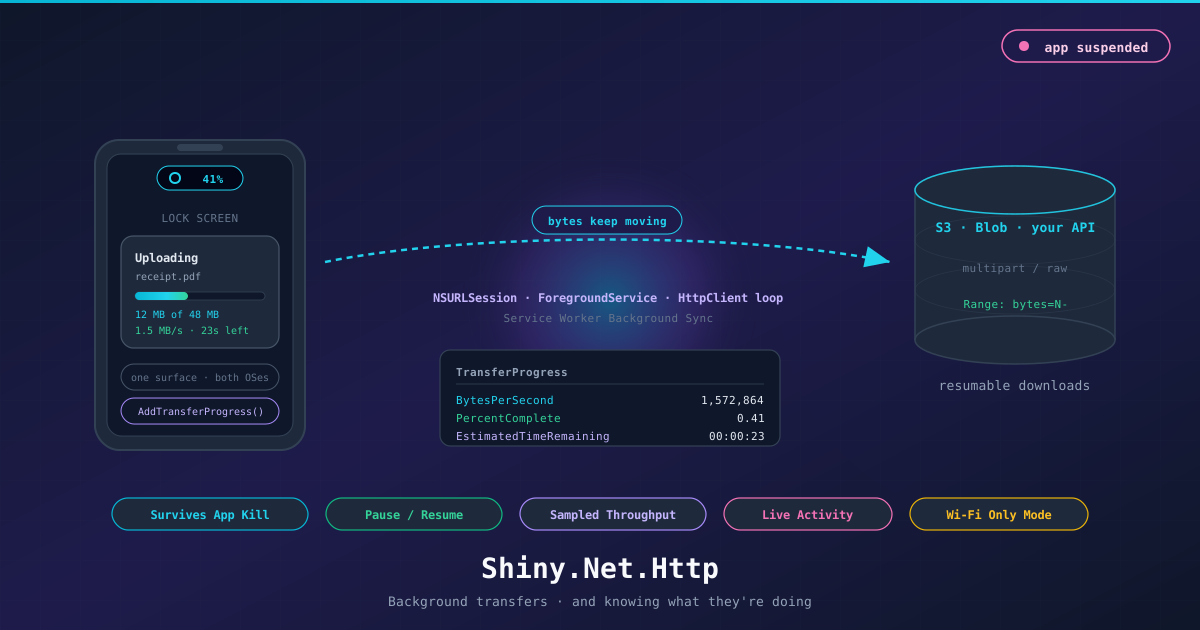
Shiny HTTP Transfers: Why Is This Data Still Not Here?
On this page
Here is a question I have been asked, in various costumes, for about a decade.
“Why is this still not here?”
Not the file — the data. The photo somebody attached twenty minutes ago. The inspection report the office has been refreshing since lunch. The overnight sync that was supposed to be done before anyone looked at it. Someone is waiting on bytes that should have arrived by now, and the app on the other end looks perfectly healthy, which somehow makes it worse.
The answer is nearly always that nothing was moving. iOS suspends your process within a few seconds of the
app going to the background: threads stop, sockets close, the await you were sitting on never comes back.
Android is less abrupt and ends in the same place — a backgrounded process with no foreground service is a
memory candidate, and on a mid-range device under pressure it gets reclaimed.
So the 200 MB video stalls at 60%, and when the user next opens the app it starts again from zero. On their cellular plan. They didn’t do anything wrong. They answered a text message.
That reframes the problem, and the reframe is the whole point. The data isn’t late because something is broken — the OS is doing precisely what it promised to do the day it suspended you. It’s late because for nineteen of those twenty minutes nobody was carrying it. The instinct is to fight that with a background task assertion here, a wake lock there, a retry loop that tries harder, and that fight cannot be won.
The move is to stop being the one holding the socket.
Ten years of the same problem
I have a soft spot for this library. It is the oldest thing I maintain — it started in 2016 as a Xamarin plugin, years before Shiny existed, back when the answer to “how do I upload a file in the background” was a Stack Overflow post with three contradictory answers and one of them was wrong. It has been rewritten more times than I can count, moved platforms twice, and it is still the module I personally reach for most often. Every app I have shipped has, eventually, needed to move a file at a moment when nobody was looking at the screen.
That is the thing about file transfer: it never shows up in the spec. It shows up six weeks before release, when someone finally tests the app on a phone that isn’t sitting on a desk with the screen on.
Hand the bytes to the platform
Every platform has a thing that moves files on your behalf while you are not running. iOS has background
NSURLSession, owned by a system daemon that will happily relaunch your app in the background when
the transfer finishes. Android has the foreground service, which is the one contract that keeps a process
alive. Browsers have Service Worker Background Sync, which drains a queue with fetch() while the tab is
closed.
They are all different, all fiddly, and all worth using. So that’s what Shiny.Net.Http does — one API, and underneath it whatever the platform actually runs for you.
builder.Services.AddHttpTransfers<MyTransferDelegate>();await transferManager.Queue(new HttpTransferRequest(
"receipt-upload",
"https://api.example.com/receipts",
TransferType.UploadMultipart,
filePath
));Suspend the app on the next line. Kill it. The bytes keep going.
| Platform | What is carrying it |
|---|---|
| iOS / Mac Catalyst | Background NSURLSession — OS-owned, relaunches your app to finish |
| Android | A managed HttpClient loop inside a foreground service |
| Windows, Linux, macOS, plain .NET | The same loop, every pass gated on IConnectivity |
| Blazor WASM | Service Worker Background Sync over an IndexedDB queue |
The Android half, which is less glamorous
iOS gets a daemon. Android gets you, still holding the socket, but with a note pinned to your process saying please don’t kill this one.
That note is the foreground service, and it is genuinely the only contract Android offers for “this is
going to take a while and the user knows about it”. So that is where the queue runs.
HttpTransferService comes up on your first Queue(), or at app start if there is anything still in the
repository, and it shuts itself down the moment the queue empties. I care about that last bit more than
it probably warrants, because nothing makes an app feel more like malware than a permanent notification
for work that finished an hour ago.
The interesting part isn’t the service though. It is what the loop inside it does about the network, because on a phone the network is not a thing you have. It is a thing you keep losing.
Every pass checks before it tries anything at all:
if (connectivity.IsInternetAvailable())
{
    var full = connectivity.ConnectionTypes.HasFlag(ConnectionTypes.Wifi);
    // ... run each pending transfer
}
No connection, nothing gets sent. Which sounds obvious, and is not what most code does: the naive version fires the request anyway, catches the exception, and calls your error handler — so your app logs a failure and quite possibly tells the user something went wrong, when what actually happened is they walked into an elevator.
Same story in the middle of a transfer. An IOException (or a Java.Net.SocketException) 300 MB into a
file is not an error. It’s an elevator.
catch (IOException ex)
{
    this.PauseTransfer(transfer, "Network Disconnected", ex);
}
So it goes to PausedByNoNetwork and stays in the repository. The next pass with a connection picks it
straight back up, and because a download re-asks with Range: bytes=N- from whatever is already on disk,
the elevator costs you the elevator rather than the file.
There are four ways a transfer can be sitting still, and I keep them apart on purpose:
| State | Who stopped it | What starts it again |
|---|---|---|
PausedByNoNetwork |
The network went away | The network coming back — by itself |
PausedByCostedNetwork |
It’s metered and you said Wi-Fi only | Wi-Fi — by itself |
Paused |
A person | Resume(). Only Resume() |
Error |
The server said no | You, in your delegate |
Only the user’s pause is sticky. The two the network caused clear themselves; the one a person made does not, because a person made it. Collapsing those into one “paused” is how you end up resuming an upload somebody deliberately stopped, on the cellular plan they stopped it to protect.
The one thing I can’t route around is Android’s own budget. As of Android 15 dataSync is capped at six
hours a day, and shortService — opt in with HttpTransferService.UseShortService if your transfers are
short bursts and you’d rather skip the type-specific manifest permission and the Play Store declaration —
gets about three minutes per promotion. Both call onTimeout, and if you don’t stop promptly Android
gives you an ANR, which is a rude way to learn about it. So the service stops, logs a warning, and leaves
the queue exactly where it is. The next Queue() or the next launch re-arms it. Deferred, not lost —
which is the best answer available, and I would rather write that sentence than pretend the cap isn’t
there.
The parts I refuse to paper over
An abstraction over four engines is only useful if it is honest about where they genuinely differ. The temptation is to sand off the edges so the API reads nicely. That produces the library that works in the demo and lies in production, so:
Downloads resume. Range: bytes=N- is one header, 206 Partial Content is one status code, and
between them they were standard long before any of us were shipping mobile apps. Every static host, every
CDN, every object store answers them. So the managed loop asks, appends on a 206, and — when a server
ignores the header and cheerfully returns the entire body with a 200 — restarts and logs that it
restarted, rather than gluing a second copy of the file onto the first. iOS resumes natively. A 400 MB
download that dies at 380 MB in a tunnel costs 20 MB, not 400, and because the bytes already on disk get
counted into the total from Content-Range, the bar comes back where it was instead of at zero.
Uploads don’t, and that mostly isn’t up to me. Resuming an upload means the server has to tell you
how many bytes it already holds and agree to take the rest from there. That is a protocol, not a header.
tus specifies it properly and is genuinely good — and in the ten years I have been
maintaining this thing, I have watched approximately nobody adopt it. It isn’t in ASP.NET Core out of the
box. It isn’t in Express, or FastAPI, or Rails, or Spring. The object stores get closest, because S3
multipart and Azure block commits have all the pieces, but that’s a vendor API rather than something I can
assume about your POST /receipts — and the object-store builders further down still do a single PUT.
So Resume on an upload means “start over”, everywhere, and I would rather write that sentence than let
you find it in production. The day a resumable upload endpoint is an ordinary thing for a web framework to
hand you, this will use it.
Pause and Cancel are different verbs. Cancel removes the transfer and deletes the partial file.
Pause leaves it in the queue as Paused, and — this is the bit people expect wrongly — it stays paused
across a relaunch and across the network coming back. A user paused it. Only Resume unpauses it.
UseMeteredConnection = false actually parks the transfer. It goes to PausedByCostedNetwork and
waits for Wi-Fi instead of quietly spending someone’s data allowance.
And the queue lives in a repository, not in memory, because on iOS the process that finishes your transfer is regularly not the process that started it.
“Why don’t you just use the Azure SDK?”
Because it is the same bug in nicer packaging.
BlobClient.UploadAsync is an await in your process, on a socket your process owns. That is the exact
arrangement the last two thousand words were about escaping. iOS suspends you, the socket goes, the SDK’s
extremely sensible retry policy is suspended right along with it, and there is no seam anywhere in that
API where you could hand the remaining bytes to NSURLSession instead. The SDK isn’t wrong. It was
written for a server, and on a server it is excellent. It just quietly assumes you are still running, and
on a phone you are not.
Then there is the credentials thing, which bothers me more.
Both SDKs are shaped around a client that holds an account key or a set of IAM credentials. Put one of
those in a mobile app and you have not stored a secret, you have published one — an .ipa or an .apk
is a zip file, anyone can pull it off a device and open it, and the key you shipped almost always grants
a great deal more than “write this one file”. I have found storage account keys in shipped apps. More
than once.
The shape that works is the inverse. Your server mints a SAS token or a presigned URL, scoped to one
blob, expiring soon, and the device never holds anything worth stealing. And once you have done that,
look at what is actually left of the upload: a PUT, a URL, and a couple of headers. There is no
SDK-shaped hole left to fill.
So the builders are just the wire protocol, and the wire protocol is small:
var request = new AzureBlobStorageUploadRequest(filePath)
    .WithBlobContainer("myaccount", "receipts")
    .WithSasToken(sasFromYourApi)
    .Build();

await transferManager.Queue(request);
var request = new AwsS3UploadRequest(filePath)
.WithBucket("receipts", "us-east-1")
.WithObjectKey($"2026/08/{Guid.NewGuid()}.pdf")
.WithPresignedUrl(urlFromYourApi) // or .WithCredentials(...) to sign on the device
.Build();Azure wants x-ms-blob-type: BlockBlob and a Content-Length. S3 wants Signature V4, which sounds
intimidating and turns out to be one HMAC over a canonical string, off a key derived in four chained
steps — a page of System.Security.Cryptography and no dependencies. Both builders hand back an ordinary
HttpTransferRequest, which then goes through the same queue, the same repository, the same foreground
service and the same Live Activity as everything else. They are not a second transfer path.
There is one shortcut in the S3 signer I want to point at, because it is the kind of thing you only
notice on a phone. A by-the-book SigV4 signature covers a SHA-256 of the body. For a 400 MB video that
means reading the entire file end to end — on battery, before a single byte leaves the device — and then
reading it a second time to actually send it. On a laptop nobody notices. On a phone, with five videos
queued, everybody notices. S3 explicitly permits UNSIGNED-PAYLOAD over HTTPS, so:
// S3 allows UNSIGNED-PAYLOAD so we don't need to hash potentially large files
var payloadHash = "UNSIGNED-PAYLOAD";
And one caveat I would rather you read here than discover at 6am. A signature has a clock. SigV4 is
stamped with x-amz-date at Build() time and AWS won’t accept it much more than fifteen minutes later.
A background transfer might sit in the queue all night waiting for Wi-Fi. Those two sentences do not like
each other, and the way it surfaces is a 403 landing in your OnError.
So if the transfer might wait — and the entire premise of this library is that it might — get a presigned
URL or a SAS from your server with an expiry that covers the waiting. WithCredentials and
WithSharedKeyAuthorization are for transfers you expect to go now, and for desktop and server code,
where the credentials were never the problem in the first place.
“Why not just use a background job?”
I get asked this a lot, usually by someone who has already tried it. Shiny ships a job scheduler, and it is good. It is also the wrong tool for a blob, and I want to be specific about why rather than just asserting it.
A job is a time window. A background transfer is a handoff. Everything else follows from that.
On iOS a Shiny job is a BGProcessingTaskRequest on BGTaskScheduler. You do not choose when it runs —
iOS does, generally when the device is idle and charging, throttled by how often the user actually opens
your app. And iOS does not just choose when the window opens, it chooses when it slams shut:
ExpirationHandler fires, the CancellationToken your job is holding cancels, and the stream you were
copying stops exactly where it was. No resume state, no partial credit, nothing on disk you can trust.
Now picture a 200 MB video going up over LTE inside that window. It doesn’t fit. And the user who tapped Send thirty seconds ago is not expecting their upload to happen tonight while they’re asleep, which is frequently when iOS decides your processing task deserves a turn.
A background NSURLSession has no window at all. The daemon owns the socket. It keeps going while you’re
suspended, it keeps going after you’re terminated, and iOS relaunches your process in the background
specifically to hand you the result. Nothing on iOS relaunches a dead app to run a job.
It cuts the same way for downloads. Expire a job 380 MB into a 400 MB file and you are holding nothing
usable, unless you wrote the Range bookkeeping and persisted the byte counts yourself — at which point
you have written a transfer layer, just without the daemon that would have kept it running while you were
suspended. Hand it over instead and the resume, the partial file and the counts are all simply there for
whichever process picks it up next.
Android gets there by a different road. Jobs there are WorkManager PeriodicWorkRequest — fifteen minutes
is the floor on the period, and a worker gets stopped at roughly ten minutes of execution. A big file on a
bad connection doesn’t finish in ten minutes, and starting over every fifteen isn’t progress, it’s a loop.
So transfers run under a foreground service instead, which is the contract Android genuinely offers for
“this is going to take a while and the user knows about it”.
| Jobs | Transfers | |
|---|---|---|
| Starts | When the OS feels like it | Now |
| Time limit | iOS expiration handler; ~10 min WorkManager worker | None |
| Survives termination | No | Yes — iOS relaunches you to deliver it |
| Resume | Whatever you build | Range / native, byte counts persisted |
| Something to show the user | No | Live Activity / foreground notification |
None of which means jobs are useless here. They’re great around a transfer — reconcile state afterwards, sweep up finished files, decide what to queue next. Just don’t ask one to carry the bytes.
Now, the metrics
Once the transfer has left your process, “is it working?” stops being rhetorical. Somebody has to be able to answer it — you, in a log; the user, on a Lock Screen.
Every update carries a TransferProgress:
manager.UpdateReceived += (_, result) =>
{
    var p = result.Progress;
    Console.WriteLine($"{p.PercentComplete:P0} · {p.BytesPerSecond} B/s · {p.EstimatedTimeRemaining} left");
};
Two small decisions in there that I care about more than they probably deserve.
PercentComplete returns -1 when the size is unknown, not 0. A chunked response has no
Content-Length. There is a real difference between “nothing has happened yet” and “I have no idea how
big this is”, and collapsing them into 0 means every progress bar in every app downstream shows a
confident, wrong zero. IsDeterministic is right there next to it, and an indeterminate spinner is the
honest rendering.
Throughput is sampled, not averaged. The read loop counts into an accumulator, and only when the stopwatch passes two seconds does it divide, publish, and reset both:
else if (stop.Elapsed.TotalSeconds > 2)
{
    var bps = Convert.ToInt64(totalSince / stop.Elapsed.TotalSeconds);
    this.PublishProgress(transfer, new TransferProgress(bps, totalBytes, totalBytesXfer));
    totalSince = 0;
    stop.Restart();
}
A cumulative average drags the transfer’s history around forever: hit one bad tunnel at the start of a big download and the number stays wrong for ten minutes, and so does the ETA computed from it. A rolling window reports what is happening now, which is the only rate a “time remaining” figure can honestly be based on.
The window doubles as backpressure. An 8 KB read loop on a good connection would otherwise fire thousands of events a second, and every one of them would land on someone’s UI thread.
On iOS I don’t compute it at all — NSProgress.Throughput off the task is a better number than anything
I could derive, because the daemon is the one actually moving the bytes.
Each tick also persists the byte counts, which is what lets an app relaunched mid-transfer draw a bar that is already in the right place instead of starting from zero and looking broken.
Consuming it is three flavours, and it is worth picking the right one:
// the firehose
manager.UpdateReceived += handler;

// one transfer, awaited to a terminal state
var result = await manager.WatchTransfer("receipt-upload");

// a bindable collection for a screen
await monitor.Start(syncContext: SynchronizationContext.Current);
HttpTransferMonitor is the one for UI — it seeds from the repository, follows adds and removes as well
as progress, marshals to your SynchronizationContext, and evicts finished rows on its own.
The metrics the user sees
But the whole premise is that the user is not in your app. So the numbers have to show up somewhere they can actually see: an iOS Live Activity on the Lock Screen and in the Dynamic Island, or the Android foreground-service notification — which on Android 16 gets promoted to a live update with a status bar chip.
One call, and nothing in your delegate:
builder.Services.AddTransferProgress(opts =>
{
    opts.Scope       = TransferProgressScope.Summary;
    opts.Fields      = TransferProgressFields.Default;   // file, direction, %, bytes, speed, ETA
    opts.ShortStatus = TransferProgressShortStatus.Percent;
});
Deliberately one manager for both platforms. The interesting parts — coalescing the firehose down to one update a second, aggregating five transfers into one figure, keeping finished ones in the aggregate so the bar never walks backwards when one of them completes, retiring the surface afterwards — are exactly the parts that would quietly drift apart if iOS and Android each kept their own copy. The platform piece implements drawing and nothing else.
It also subscribes at startup rather than on first use, which sounds like a detail and isn’t: when iOS relaunches your app in the background to hand you a finished transfer, the manager has to already be listening in order to move the Lock Screen to its final state.
Which brings the question back around
“Why is this still not here” has a second half — and is it even moving? That is the question a Lock
Screen has to answer, and iOS makes answering it awkward: a background NSURLSession delivers no
progress callbacks while your app is suspended. None. DidWriteData goes quiet, and iOS wakes you when
the thing is done.
So a percentage bar freezes at 12% for four minutes and then jumps straight to complete — which reads exactly like the failure the person was already suspicious of. A stalled number is worse than no number.
The way out is to stop sending a percentage and send a time range the system animates on its own — and to anchor the start of that range in the past, at the moment a constant-rate transfer would have begun. Then the bar is already sitting at the true fraction and keeps sliding without any further input from a process that isn’t running. (Anchor it at “now” and the bar snaps back to zero on every single update, which is a delightful bug to watch once.) Every real callback re-anchors it, and it falls back to a plain fraction when the transfer stalls, pauses, has no known size, or when the projection gets long enough to be fiction rather than an estimate.
Android just resolves the range back to a fraction. Its foreground service is alive the whole time, so real numbers keep arriving and it never needs to coast.
For uploads there is one more trick available, and it is the exact one: your server knows how many bytes actually landed. Turn on push tokens and it can push byte-accurate progress through the entire suspended window. It does nothing at all for downloads — no server has any idea how far the device got.
Go break it
Docs are at shinylib.net/httptransfers. The bit I would most like feedback on is the progress surface, because “what should this say” is a design question, not an engineering one, and I have only my own apps to argue with.
dotnet add package Shiny.Net.Http