Turn Any Interface Into an AI Tool — Shiny DI 3.0
On this page
I’ve been building source generators for Shiny’s DI library for a while now — attribute-driven service registration, keyed services, categories, open generics — all the stuff that saves you from writing services.AddSingleton<IFoo, Foo>() a hundred times. But with Microsoft.Extensions.AI becoming the standard abstraction for AI tool calling, I kept noticing the same problem: people were writing tedious AIFunction subclasses by hand for every operation they wanted to expose to an LLM.
So I added AI tool generation to the DI source generator. Here’s how it works.
The Tedious Part
Say you have a service interface:
public interface IOrderService
{
    Task<OrderResult> PlaceOrderAsync(Guid customerId, string sku, int quantity);
    Task CancelOrderAsync(Guid orderId, string reason);
}
To expose PlaceOrderAsync as an AI tool, you’d normally write something like:
public class PlaceOrderAITool : AIFunction
{
    private readonly IOrderService _service;
    private static readonly AIFunctionMetadata _metadata = new("PlaceOrder")
    {
        Description = "Places a new order",
        Parameters = new AIFunctionParameterMetadata[]
        {
            new("customerId") { ParameterType = typeof(Guid), IsRequired = true },
            new("sku") { ParameterType = typeof(string), IsRequired = true },
            new("quantity") { ParameterType = typeof(int), IsRequired = true }
        }
    };

    public PlaceOrderAITool(IOrderService service) => _service = service;
    public override AIFunctionMetadata Metadata => _metadata;

    protected override async Task<object?> InvokeCoreAsync(
        IEnumerable<KeyValuePair<string, object?>>? arguments,
        CancellationToken cancellationToken)
    {
        // parse arguments from dictionary, cast types, handle JsonElement...
        // call _service.PlaceOrderAsync(...)
    }
}
Now do that for every method. Then register each one. Then keep them in sync when signatures change. It’s the kind of work that makes you question your career choices.
The New Way
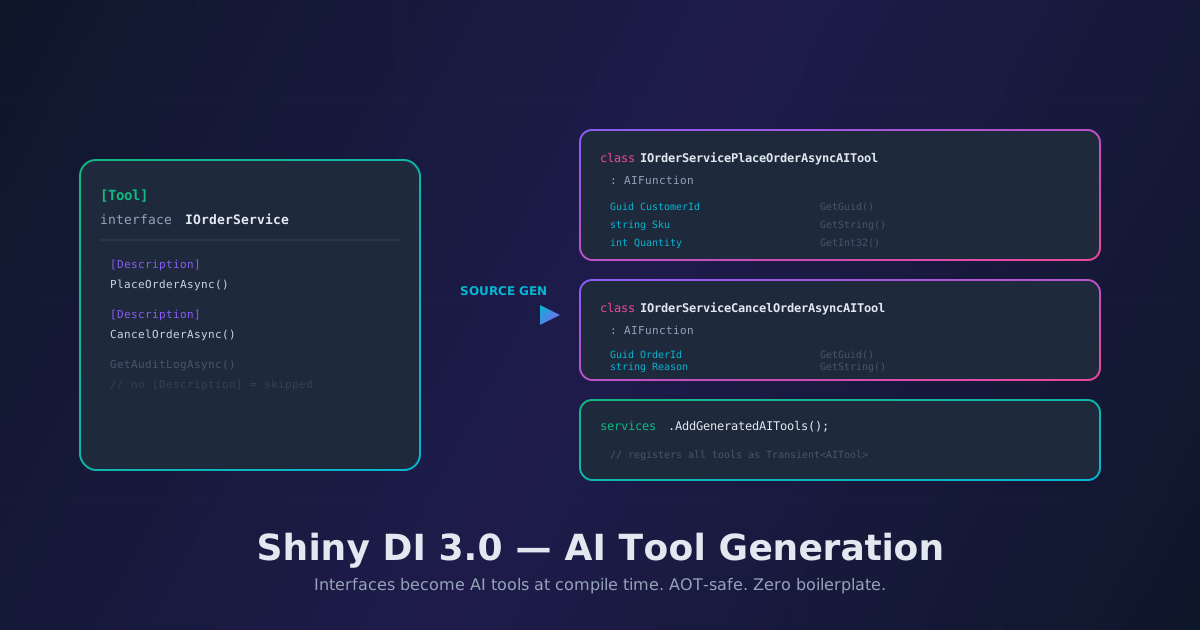
[Tool]
[Description("Manages customer orders")]
public interface IOrderService
{
    [Description("Places a new order for a customer")]
    Task<OrderResult> PlaceOrderAsync(
        [Description("The customer identifier")] Guid customerId,
        [Description("The product SKU")] string sku,
        [Description("Number of units")] int quantity
    );

    [Description("Cancels an existing order")]
    Task CancelOrderAsync(
        [Description("The order to cancel")] Guid orderId,
        [Description("Reason for cancellation")] string reason
    );

    // No [Description] — not exposed as a tool
    Task<List<Order>> GetInternalAuditLogAsync();
}
That’s the entire setup. The source generator:
- Finds interfaces marked with
[Tool] - Creates an
AIFunctionsubclass for each method that has[Description] - Wires up the metadata, properties, and argument extraction
- Generates an
AddGeneratedAITools()extension method that registers everything
Methods without [Description] are ignored. You decide what the LLM can call.
Registration
services.AddGeneratedServices();   // your existing DI registrations
services.AddGeneratedAITools();    // generated AI tools — all transient

// Then in your chat setup:
var tools = serviceProvider.GetServices<AITool>().ToList();
var options = new ChatOptions { Tools = tools };
var response = await chatClient.GetResponseAsync(messages, options);
Conditional Generation
Here’s a detail I’m particularly happy about: the AI tool code is only generated when Microsoft.Extensions.AI is referenced in the consuming project. If you’re using the DI package without M.E.AI, the [Tool] attribute compiles fine (it’s just a plain attribute), but zero AI tool code is emitted. No phantom dependencies, no unused generated files.
AOT-Safe Argument Extraction
This is where things get interesting. When an AI framework calls your tool, arguments arrive as IEnumerable<KeyValuePair<string, object?>>. The object? value might be already deserialized to the correct type — or it might be a JsonElement. Most hand-written tools get this wrong, either by assuming one or the other.
The generator handles both. For every standard type, it emits the direct JsonElement accessor — no reflection, no JsonSerializer.Deserialize<T>():
| Type | JsonElement Accessor |
|---|---|
string |
GetString() |
int, long, short, byte |
GetInt32(), GetInt64(), etc. |
bool |
GetBoolean() |
double, float, decimal |
GetDouble(), GetSingle(), GetDecimal() |
Guid |
GetGuid() |
DateTime, DateTimeOffset |
GetDateTime(), GetDateTimeOffset() |
DateOnly, TimeOnly, TimeSpan |
Parse(GetString()) |
| Enums | Enum.Parse<T>(GetString()) |
Complex types fall back to JsonSerializer.Deserialize<T>(), which needs a JsonSerializerContext for full AOT compliance. But for the vast majority of AI tool parameters — strings, numbers, GUIDs, dates, enums — it’s fully AOT-safe out of the box.
The generated code looks like:
case "customerId":
    this.CustomerId = arg.Value is JsonElement je
        ? je.GetGuid()
        : (Guid)arg.Value!;
    break;
Clean, fast, no reflection.
CancellationToken
If your method takes a CancellationToken, the generator does the right thing: passes it through from InvokeCoreAsync’s token, doesn’t expose it as a tool parameter, and doesn’t include it in the metadata. You don’t have to think about it.
[Description("Searches products")]
Task<List<Product>> SearchAsync(
    [Description("Search query")] string query,
    CancellationToken cancellationToken  // handled automatically
);
What Gets Generated
For each described method, you get a class named {InterfaceName}{MethodName}AITool that:
- Extends
AIFunction - Takes the interface via constructor injection
- Has
AIFunctionMetadatawith name, description, and parameter metadata - Has typed properties for each parameter
- Extracts arguments AOT-safely in
InvokeCoreAsync - Calls the original service method with the extracted values
And a registration class with AddGeneratedAITools() that registers them all as Transient<AITool>.
Plays Nice With Existing Setup
[Tool] goes on interfaces. [Singleton] / [Scoped] / [Transient] go on implementation classes — same as always. The two generators are independent. Your existing AddGeneratedServices() call doesn’t change. You just add AddGeneratedAITools() next to it.
Getting Started
- Update to Shiny.Extensions.DependencyInjection 3.0
- Add
[Tool]to your service interface - Add
[Description]to methods you want exposed as tools - Add
[Description]to parameters (helps the LLM pick the right values) - Reference
Microsoft.Extensions.AI - Call
services.AddGeneratedAITools() - Resolve
IEnumerable<AITool>and pass to your chat client
The full documentation is at shinylib.net/di and the source is on GitHub.